

SetupProject
Overview
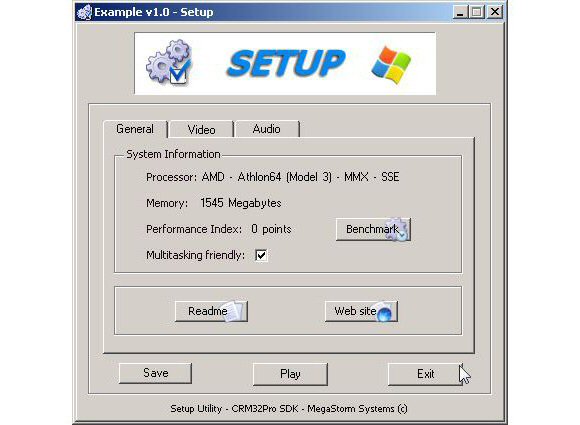
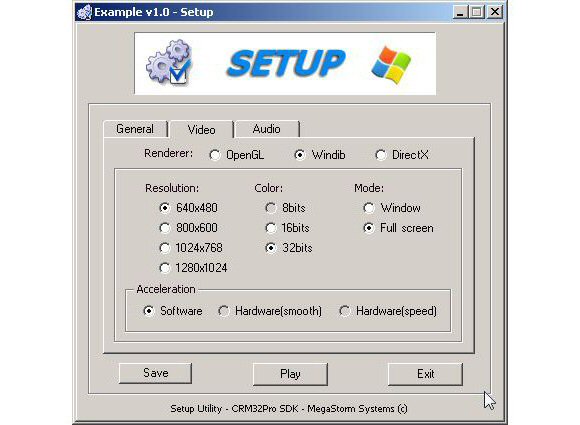
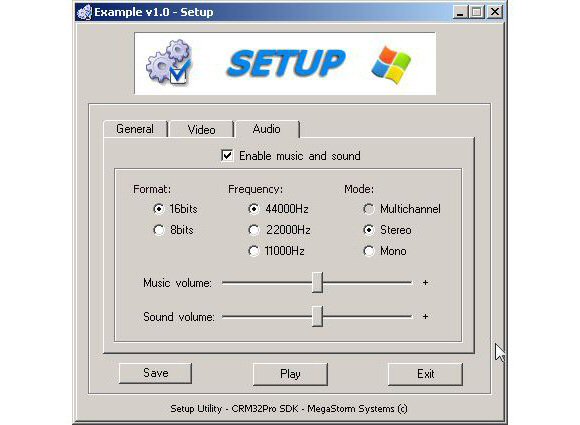
Setup and configuration tool for allowing the user to choose video (resolution, window mode, …) and audio (frequency, channel number, volume, …) settings that can be saved to a XML (stand-alone file or embedded on a DPF) which can be easy loaded from your application using CRM32Pro. Your application can also be executed from this tool.
It is fully customizable through a XML file (layout.xml). This file sets the skin to be used and all parameters which define the look & feel and the functionality: changing the logo, icons, main buttons (save, play and exit), …
All graphics resources are stored in a DPF (setup.dpf), where usually are the two main XML files: layout.xml and setup.xml. The latter one is where the video and audio settings are stored.
Details
- Fully customizable: GUI graphics, default values and enabled controls using layout.xml file.
- Save selected configuration settings.
- Play button to directly execute your application.
- Up to 7 custom buttons for opening ASCII or HTML files or an URL.
- Detects CPU model, supported instruction set and available memory.
- Built-in benchmark is included to measure the CPU, memory and video performance giving a performance index (20% integer, 20% float, 25% memory and 35% blitting). This index can be used to require a minimum value for final users assuring a smooth execution of your application.
- Available for Linux, MacOS X and Windows.
- Developed in C++ using CRM32Pro SDK.
Download
Lastest version: v1.10b (3-April-2012)
ChangeLog | Roadmap | Free to use but closed source
 Linux
Linux MacOS X
 Windows
- Source code
- Closed source code.
 Not available
- Previous releases
- Get access to all releases repository.
 Repository