

CRM64Pro Tutorial 16.2
Scene Island Game v2.
Load a Tiled island, build movement costs from an image, move a player with weighted A* pathfinding, and switch between follow and free camera modes.
Final result
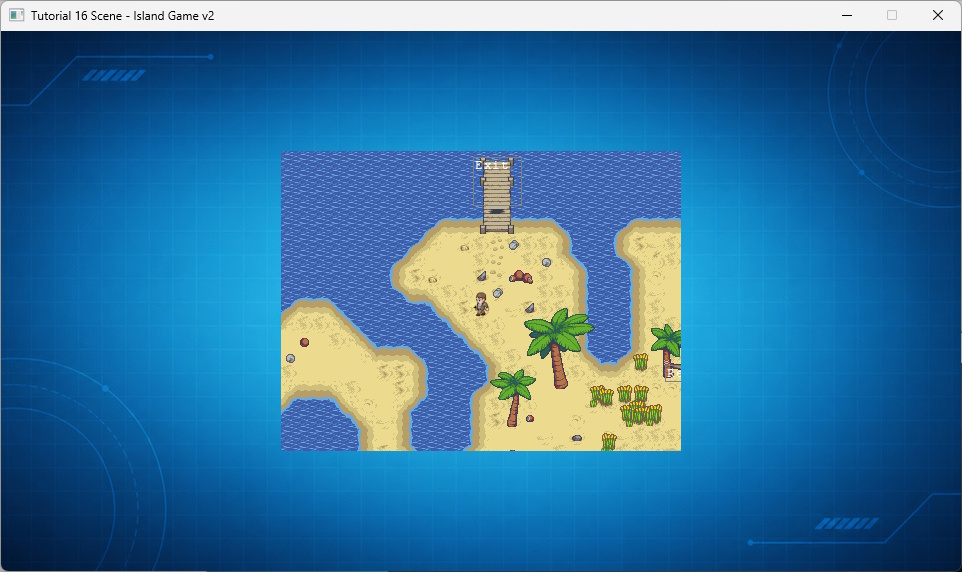
Right-click finds an A* path and returns to follow mode; left-click reports the selected Scene object; C switches between follow and free camera modes; arrow keys pan in free camera mode; F1/F2 toggle the grid or movement costs; S toggles smooth scrolling; and Q or ESC exits.
Prerequisites
- CRM64Pro GDK installed and configured with a supported C++17 compiler.
- Tutorial package downloaded and fully extracted, preserving its folder structure.
- Understand Scene layers and TMX object factories.
- Included assets available under
bin/Base/:tiled/rpg/island.tmx,tiled/rpg/island-heightmap.png,sprite2.png. - Keep
Tutorial_bginTutorial.cdc.
What you will learn
- Load TMX objects through a Scene factory.
- Build a runtime cost layer from image brightness.
- Use weighted four-direction A* pathfinding.
- Move and animate a Scene object along a path.
- Switch between snap-follow and manual cameras.
Island Game v1: the simpler reference
v1 uses the same island, runtime cost layer, A* pathfinding, and player interaction, but its camera always follows the player. Start there when learning pathfinding; use v2 when you also need follow/manual camera switching.
Step 1: Keep shared state small
The callbacks and custom objects share only the Scene, background, debug font, tile size, and camera mode.
struct TutorialState
{
    Scene* pScene = nullptr;
    Sint32 idBgImage = -1;
    Sint32 idDebugFont = -1;
    Sint32 iTileSize = 16;
    bool bCameraFollow = true;
};
Step 2: Create the player from TMX
The factory replaces objects whose type is start with Player. Other objects use the Scene default.
class TutorialObjectFactory : public ISceneObjectFactory
{
public:
    SceneObject* create(const string& rType) override
    {
        if(rType == "start")
        {
            return new(std::nothrow) Player();
        }
        return nullptr; // Return null to let Scene create a generic object
    }
};
Step 3: Load the island Scene
Pass the factory while loading so objects are constructed as the TMX is parsed.
static TutorialObjectFactory Factory;
string sTMX = BASEDIR "tiled/rpg/island.tmx";

Sint32 idScene = mC64.sceneMgr().loadFromFile(sTMX, &Factory);
if(idScene < 0)
{
    mLog.msg(LL_CRITICAL, "Failed to load TMX: %s\n", sTMX.c_str());
    return false;
}

// Retrieve the engine pointer from the Manager
g_pState->pScene = mC64.sceneMgr().get(idScene);
if(!g_pState->pScene) return false;
Step 4: Add the runtime cost layer
Layer 1 supplies the grid size. The custom layer is added at index 5 and stays hidden until F2 is pressed.
// 2. Create Layer 5 (HeightMap) from Layer 1 dimensions.
SceneLayerTile* pLayer1 = g_pState->pScene->accessLayerTile(1);
if(!pLayer1)
{
    mLog.msg(LL_ERROR, "Required tile layer 1 was not found.\n");
    return false;
}

// Use tile size from loaded layer 1 as source of truth.
const Sint32 iMapW = pLayer1->getWidth();
const Sint32 iMapH = pLayer1->getHeight();
g_pState->iTileSize = pLayer1->getCellWidth();
if(iMapW <= 0 || iMapH <= 0 || g_pState->iTileSize <= 0)
{
    mLog.msg(LL_ERROR, "Tile layer 1 has invalid dimensions.\n");
    return false;
}

SceneLayerHeightMap* pLayerHM = new(std::nothrow) SceneLayerHeightMap("HeightMap", iMapH, iMapW);
if(!pLayerHM)
{
    mLog.msg(LL_ERROR, "Failed to allocate the heightmap layer.\n");
    return false;
}
if(!pLayerHM->setCellWidth(g_pState->iTileSize) ||
    !pLayerHM->setCellHeight(g_pState->iTileSize))
{
    delete pLayerHM;
    mLog.msg(LL_ERROR, "Failed to configure the heightmap cell size.\n");
    return false;
}

// Add to Engine at index 5
if(g_pState->pScene->addLayer(pLayerHM, 5) < 0)
{
    delete pLayerHM;
    mLog.msg(LL_ERROR, "Failed to add the heightmap layer.\n");
    return false;
}
Step 5: Convert brightness to movement cost
Black is blocked cost 255. Brighter pixels produce lower movement costs, down to 1.
Uint8 iR = 0, iG = 0, iB = 0, iA = 0;
if(!SDL_ReadSurfacePixel(sH, iPX, iPY, &iR, &iG, &iB, &iA))
{
    mC64.imageMgr().close(idImgH);
    mLog.msg(LL_ERROR, "Failed to read Heightmap image pixels.\n");
    return false;
}

const Sint32 iBrightness = (iR + iG + iB) / 3;

// Black is blocked; brighter pixels have lower movement costs.
Uint32 iWeight = 255;
if(iBrightness > 10)
{
    iWeight = 255 - iBrightness;
    if(iWeight < 1) iWeight = 1;
}
pLayerHM->setCellValue(iY, iX, iWeight);
Step 6: Build weighted A*
The open set stores the best estimated cells. Movement uses four cardinal neighbors and rejects cost 255.
priority_queue<Node> vOpenSet;
vector<vector<float>> vvfCostSoFar(iHeight, vector<float>(iWidth, -1.0f));
vector<vector<SDL_Point>> vvCameFrom(iHeight, vector<SDL_Point>(iWidth, { -1, -1 }));

vOpenSet.push({ iStartX, iStartY, 0.0f });
vvfCostSoFar[iStartY][iStartX] = 0.0f;

// 4-Way movement only (No diagonals)
const Sint32 iDirs[4][2] = { {0,1}, {1,0}, {0,-1}, {-1,0} };
Uint32 iWeight = pMap->iCellMap[iNY][iNX];
if(iWeight == 255) continue; // Blocked
// Distance is always 1.0 for cardinal
float fDist = 1.0f;
// Weight 1 = Normal cost. Higher weight = Higher cost.
float fNewCost = vvfCostSoFar[mCurrent.iY][mCurrent.iX] + (fDist * (float)iWeight);
if(vvfCostSoFar[iNY][iNX] == -1.0f || fNewCost < vvfCostSoFar[iNY][iNX])
{
vvfCostSoFar[iNY][iNX] = fNewCost;
float fPriority = fNewCost + (abs(iEndX - iNX) + abs(iEndY - iNY));
vOpenSet.push({ iNX, iNY, fPriority });
vvCameFrom[iNY][iNX] = { mCurrent.iX, mCurrent.iY };
}Step 7: Spend movement across path nodes
Unused movement continues into the next node, keeping motion stable at different logic rates.
if(fDist <= fStepRemaining) // Reach node and keep remaining budget
{
    setPosition(fNextWorldX, fNextWorldY);
    fStepRemaining -= fDist;
    iCurrentPathIndex++;
    if(iCurrentPathIndex >= (int)vPath.size())
    {
        bIsMoving = false;
        vPath.clear();

        // Pause animation on stop
        if(pS) pS->pause();
        return;
    }
    continue;
}
Step 8: Require the player
The player is required for movement and camera following. The exit remains optional.
if(!pPlayer)
{
    mC64.logMgr().get()->msg(LL_ERROR, "Player object ('start') not found in Layer 3.\n");
    closeTutorial();
    return -1;
}
if(!pExit)
{
    mC64.logMgr().get()->msg(LL_INFO, "Exit area object ('exit') not found in Layer 3.\n");
}
Step 9: Configure follow mode
The default camera snaps to the player and clamps the viewport to map bounds.
SceneCameraParams mCam;
mCam.bClampToBounds = true;
mCam.fDamping = 0.0f;
mCam.ptTargetAnchor = { 0.5f, 0.5f };
mCam.ptScreenAnchor = { 0.5f, 0.5f };
if(!g_pState->pScene->setCameraTarget(1, pPlayer) ||
    !g_pState->pScene->setCameraParams(1, mCam) ||
    !g_pState->pScene->setCameraMode(1, SCM_SNAP))
{
    mC64.logMgr().get()->msg(LL_ERROR, "Failed to configure the Scene camera.\n");
    closeTutorial();
    return -1;
}
Step 10: Switch camera modes
C selects snap-follow or manual mode. Arrow keys move the camera anchor while manual mode is active.
if(ev.key.key == SDLK_C)
{
    g_pState->bCameraFollow = !g_pState->bCameraFollow;
    if(g_pState->bCameraFollow)
    {
        if(pPlayer) g_pState->pScene->setCameraTarget(1, pPlayer);
        g_pState->pScene->setCameraMode(1, SCM_SNAP);
    }
    else
    {
        g_pState->pScene->setCameraMode(1, SCM_MANUAL);
    }
}
if(!g_pState->bCameraFollow)
{
float fDX = 0.0f;
float fDY = 0.0f;
if(mC64.getKeyState(SDLK_LEFT)) fDX -= fCameraPanStep;
if(mC64.getKeyState(SDLK_RIGHT)) fDX += fCameraPanStep;
if(mC64.getKeyState(SDLK_UP)) fDY -= fCameraPanStep;
if(mC64.getKeyState(SDLK_DOWN)) fDY += fCameraPanStep;
if(fDX != 0.0f || fDY != 0.0f)
{
float fX = 0.0f, fY = 0.0f;
if(g_pState->pScene->getLayerPosition(1, &fX, &fY) >= 0)
{
g_pState->pScene->setLayerPosition(1, Position(fX + fDX), Position(fY + fDY));
}
}
}Step 11: Select a destination
Right-click converts the pointer to a layer-1 cell, starts A*, and restores follow mode.
if((iMouseB & SDL_BUTTON_MASK(SDL_BUTTON_RIGHT)) && !(iMousePrev & SDL_BUTTON_MASK(SDL_BUTTON_RIGHT)) && pPlayer)
{
    Sint32 iGX = 0;
    Sint32 iGY = 0;
    if(g_pState->pScene->mouseToCell(&iGX, &iGY, 1))
    {
        mC64.logMgr().get()->msg(LL_INFO, "Move to: Cell(%d, %d)\n", iGX, iGY);
        pPlayer->moveTo(iGX, iGY);
        g_pState->bCameraFollow = true;
        g_pState->pScene->setCameraTarget(1, pPlayer);
        g_pState->pScene->setCameraMode(1, SCM_SNAP);
    }
}
Step 12: Handle the exit and clean up
The Scene pauses for the exit dialog. Cleanup follows ownership order and also handles setup failures.
if(pPlayer && pExit && pPlayer->overlapsObject(pExit))
{
    pPlayer->bIsMoving = false;
    pPlayer->vPath.clear();

    g_pState->pScene->pause();

    if(mC64.tool().messageBox("Exit Island", "Do you want to leave the island and end the game?", MBB_YES | MBB_NO, MBT_QUESTION) == MBB_YES)
    {
        bDone = true;
    }
    else
    {
        pPlayer->setPosition(pPlayer->getX(), pPlayer->getY() + 32.0f);
    }
    g_pState->pScene->resume();
}
static void closeTutorial()
{
Main& mC64 = Main::instance();
mC64.sceneMgr().close(0);
mC64.spriteMgr().close(0);
mC64.fontMgr().close(0);
mC64.imageMgr().close(0);
Main::terminate();
}Complete source
- View Tutorial_16_Scene_IslandGame_v2.cpp
- Saved map:
islandgame_v2.tmx - Saved resources:
islandgame.cdc - Log:
Tutorial_16_Scene_IslandGame_v2.log
Previous tutorial
Combine map objects, inventory and point-and-click movement.
Tutorial index