

CRM64Pro Tutorial 16.3
Scene Platform.
Load a forest side-scroller, move a player with acceleration, gravity and jumping, resolve tile collisions, follow with a dead-zone camera, and react to a house trigger.
Final result
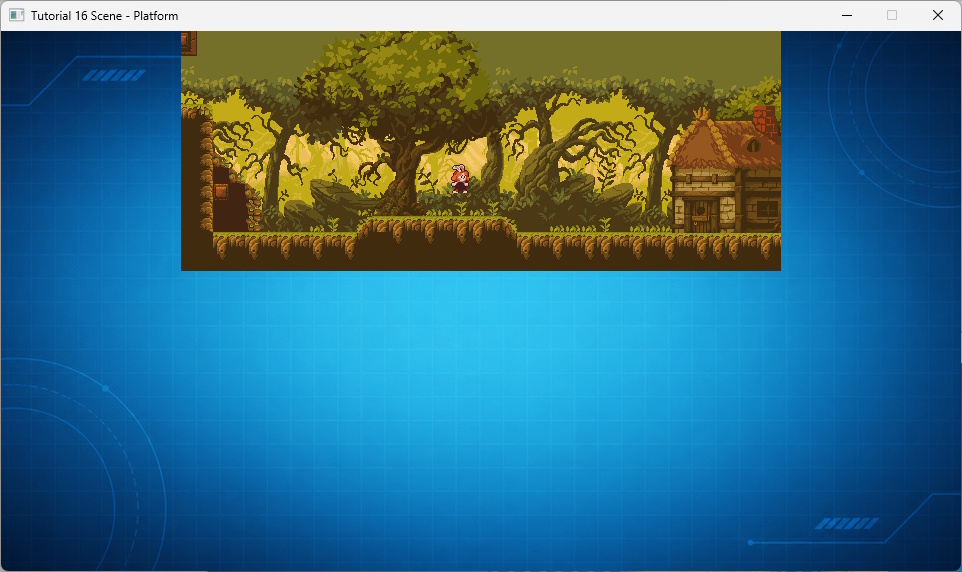
Left and right move the player; Space jumps while grounded; S toggles smooth scrolling; P/R pause or resume; D toggles object bounds; F1/F2/F3 toggle triggers, the tile grid or the camera dead zone; and Q or ESC exits.
Object bounds and triggers target standard gameplay objects, while the tile grid and camera dead zone remain independent overlays.
Prerequisites
- CRM64Pro GDK installed and configured with a supported C++17 compiler.
- Tutorial package downloaded and fully extracted, preserving its folder structure.
- Understand TMX layers and Scene object callbacks.
- Keep
bin/Base/tiled/forest/map.tmxand its resources available. - Keep
Tutorial_bginTutorial.cdc.
What you will learn
- Create Scene objects through a TMX factory.
- Implement acceleration, gravity, and jumping.
- Sweep an AABB against a tile layer.
- Configure a clamped dead-zone camera.
- Attach and process a delayed Scene trigger.
Step 1: Keep runtime state together
The player and trigger callbacks share the required Scene objects, velocity, grounded state, and UI toggles.
struct TutorialState
{
    Scene* pScene = nullptr;
    Sint32 idBgImage = -1;
    bool bJumpQueued = false;

    SceneObject* pPlayer = nullptr;
    SceneLayerTile* pGroundLayer = nullptr;

    float fVelocityX = 0.0f;
    float fVelocityY = 0.0f;
    bool bOnGround = false;

    bool bSmooth = true;
    bool bDebugAABB = false;
    bool bDebugTriggers = false;
    bool bDebugTileGrid = false;
    bool bDebugCameraDeadZone = false;
    bool bHousePromptLock = false;
    bool bHouseTriggerInside = false;
};
Step 2: Create the platform player from TMX
The factory creates PlatformPlayer for hero or player types.
class TutorialObjectFactory : public ISceneObjectFactory
{
public:
    SceneObject* create(const string& rType) override
    {
        if(rType == "hero" || rType == "player") return new(std::nothrow) PlatformPlayer();
        return nullptr;
    }
};
void initialize() override
{
if(getWidth() <= 0.0f || getHeight() <= 0.0f) setSize(96.0f, 128.0f);
}Step 3: Accelerate toward the requested speed
Ground and air use different acceleration while sharing the same target velocity.
const bool bLeft = mC64.getKeyState(SDLK_LEFT);
const bool bRight = mC64.getKeyState(SDLK_RIGHT);
const Sint32 iMoveAxis = (bRight ? 1 : 0) - (bLeft ? 1 : 0);

const float fDT = rContext.fDeltaTime;
const float fTargetVX = static_cast<float>(iMoveAxis) * fPlayerSpeed;
const float fAccel = g_pState->bOnGround ? fGroundAccel : fAirAccel;
g_pState->fVelocityX = approach(g_pState->fVelocityX, fTargetVX, fAccel * fDT);
Step 4: Apply jumping and gravity
A queued jump is consumed only on the ground. Gravity is clamped to the maximum fall speed.
if(g_pState->bJumpQueued && g_pState->bOnGround)
{
    g_pState->fVelocityY = fJumpVelocity;
    g_pState->bOnGround = false;
}
g_pState->bJumpQueued = false;

g_pState->fVelocityY += fGravity * fDT;
g_pState->fVelocityY = clampFloat(g_pState->fVelocityY, -2000.0f, fMaxFallSpeed);
Step 5: Sweep against the platform layer
The physics sweep returns the resolved player rectangle and collision contacts.
const float fWidth = getWidth();
const float fHeight = getHeight();
const SDL_FRect rectStart = { getX(), getY(), fWidth, fHeight };
SDL_FRect rectResolved = rectStart;
bool bHitX = false;
bool bHitY = false;
bool bGroundedSweep = false;
const bool bSweepOK = mC64.physics().sweepAABBOnLayerTile(
    rectStart,
    g_pState->fVelocityX * fDT,
    g_pState->fVelocityY * fDT,
    g_pState->pGroundLayer,
    &rectResolved,
    &bHitX,
    &bHitY,
    &bGroundedSweep,
    &PlatformPlayer::solidTileForTutorial,
    nullptr
);
if(!bSweepOK) return;
if(bHitX) g_pState->fVelocityX = 0.0f;
if(bHitY) g_pState->fVelocityY = 0.0f;
bool bGroundedProbe = false;
if(!bGroundedSweep && fabsf(g_pState->fVelocityY) <= 0.001f)
{
bGroundedProbe = mC64.physics().isGroundedOnLayerTile(
rectResolved,
g_pState->pGroundLayer,
fMaxStepDown,
&PlatformPlayer::solidTileForTutorial,
nullptr
);
}
g_pState->bOnGround = (bGroundedSweep || bGroundedProbe);
setPosition(rectResolved.x, rectResolved.y);Step 6: Decide which cells are solid
Empty cells are passable. Horizontal and lower map boundaries remain solid.
static bool solidTileForTutorial(const SceneLayerTile* pTileLayer, Sint32 iCellX, Sint32 iCellY, Uint32 iCellValue, void*)
{
    if(!pTileLayer) return false;
    const Sint32 iMapW = pTileLayer->getWidth();
    const Sint32 iMapH = pTileLayer->getHeight();

    if(iCellX < 0 || iCellX >= iMapW) return true;
    if(iCellY >= iMapH) return true;
    if(iCellY < 0) return false;
    return iCellValue != 0;
}
Step 7: Validate the fixed layer roles
Layer 3 must contain collision tiles and layer 5 must contain gameplay objects.
if(g_pState->pScene->getLayerType(iGroundLayer) != SLT_TILE)
{
    mC64.logMgr().get()->msg(LL_CRITICAL, "Layer %d must be a tile layer (platforms).\n", iGroundLayer);
    closeTutorial();
    return -1;
}

g_pState->pGroundLayer = g_pState->pScene->accessLayerTile(iGroundLayer);
if(!g_pState->pGroundLayer)
{
    mC64.logMgr().get()->msg(LL_CRITICAL, "Missing required tile layer for platforms. ground=%d\n", iGroundLayer);
    closeTutorial();
    return -1;
}
if(g_pState->pGroundLayer->getCellWidth() <= 0 || g_pState->pGroundLayer->getCellHeight() <= 0)
{
    mC64.logMgr().get()->msg(LL_CRITICAL, "Invalid tile size in layer %d.\n", iGroundLayer);
    closeTutorial();
    return -1;
}
Step 8: Require the custom player
The player must exist and be the factory-created class so its physics update runs.
SceneLayerObject* pPlayerLayer = g_pState->pScene->accessLayerObject(iPlayerLayer);
g_pState->pPlayer = findPlayerObject(pPlayerLayer);
SceneObject* pHouse = findObjectByType(pPlayerLayer, "house");
if(!g_pState->pPlayer || !pPlayerLayer)
{
    mC64.logMgr().get()->msg(LL_CRITICAL, "Missing player object layer. player=%d\n", iPlayerLayer);
    closeTutorial();
    return -1;
}

if(dynamic_cast<PlatformPlayer*>(g_pState->pPlayer) == nullptr)
{
    mC64.logMgr().get()->msg(LL_CRITICAL, "Player object must use type 'hero' or 'player' in TMX.\n");
    closeTutorial();
    return -1;
}
Step 9: Add the house trigger
The local trigger watches the player layer and emits STAY after 500 milliseconds.
SceneObjectTrigger mHouseTrigger;
mHouseTrigger.sName = "house_entry";
mHouseTrigger.ShapeLocal.eType = SST_RECTANGLE;
mHouseTrigger.ShapeLocal.calculateAABB(fHouseCheckX, fHouseCheckY, fHouseCheckW, fHouseCheckH);
mHouseTrigger.iTargetLayer = iPlayerLayer;
mHouseTrigger.iStayDelayMs = 500;
mHouseTrigger.addIncludeType("player");
mHouseTrigger.addIncludeType("hero");

if(!pHouse->addTrigger(mHouseTrigger))
{
    mC64.logMgr().get()->msg(LL_WARNING, "Failed to add house trigger zone.\n");
}
pHouse->setOnTriggerEvent(onHouseTrigger);
Step 10: Configure the dead-zone camera
The clamped camera follows the player only after it leaves the centered dead zone.
SceneCameraParams mCam;
// Dead-zone rectangle size (centered on screen anchor): camera moves only when target leaves this area.
mCam.rDeadZone = { 0.0f, 0.0f, fCameraDeadZoneX * 2.0f, fCameraDeadZoneY * 2.0f };
// Follow damping in 1/seconds. Higher values follow faster.
mCam.fDamping = 12.0f;
// Clamp camera to map/layer bounds.
mCam.bClampToBounds = true;
// Follow point on player: X and Y center
mCam.ptTargetAnchor = { 0.5f, 0.5f };
// Screen focus point where target anchor should appear: exact viewport center.
mCam.ptScreenAnchor = { 0.5f, 0.5f };
if(!g_pState->pScene->setCameraPosition(iGroundLayer, fStartCamX, fStartCamY, true) ||
    !g_pState->pScene->setCameraTarget(iGroundLayer, g_pState->pPlayer) ||
    !g_pState->pScene->setCameraParams(iGroundLayer, mCam) ||
    !g_pState->pScene->setCameraMode(iGroundLayer, SCM_DEADZONE))
{
    mC64.logMgr().get()->msg(LL_ERROR, "Failed to configure the Scene camera.\n");
    closeTutorial();
    return -1;
}
Step 11: Pause around the house prompt
STAY arms the prompt. Choosing No moves the player away and the Scene resumes.
if(ev.eType == STET_STAY)
{
    g_pState->bHouseTriggerInside = true;
}
else if(ev.eType == STET_EXIT)
{
    g_pState->bHouseTriggerInside = false;
    g_pState->bHousePromptLock = false;
}
// Freeze engine/layers before opening a modal dialog.
g_pState->pScene->pause();
const bool bExit = (Main::instance().tool().messageBox("House Found", "House found, do you want to exit?", MBB_YES | MBB_NO, MBT_QUESTION) == MBB_YES);
if(!bExit)
{
g_pState->pPlayer->setPosition(g_pState->pPlayer->getX() - 24.0f, g_pState->pPlayer->getY());
}
g_pState->pScene->resume();
return bExit;Step 12: Update and clean up
Scene::update() runs physics, triggers, and camera logic. Cleanup also handles partial setup.
g_pState->pScene->update();
if(handleHousePrompt()) bDone = true;
static void closeTutorial()
{
Main& mC64 = Main::instance();
mC64.sceneMgr().close(0);
mC64.imageMgr().close(0);
Main::terminate();
}Complete source
- View Tutorial_16_Scene_Platform.cpp
- Map:
Base/tiled/forest/map.tmx - Log:
Tutorial_16_Scene_Platform.log
Previous tutorial
Use weighted pathfinding and follow/free camera modes.
Tutorial index