

CRM64Pro Tutorial 15
TCP networking.
Run a threaded server, connect multiple command-line clients, exchange chat messages and release queued payloads safely.
Overview
This command-line tutorial creates a small TCP chat. One process starts the threaded server and joins it as a local administrative client; other processes connect as named remote clients.
A small input thread keeps console reading separate from the main receive loop. The main thread drains queued network messages, handles control events and releases every returned payload through NetTCP::freeData().
This is a narrow console-threading example: the input thread uses only documented thread-safe NetTCP operations and logging. It does not access graphics, Scene state or general GDK objects.
Final result
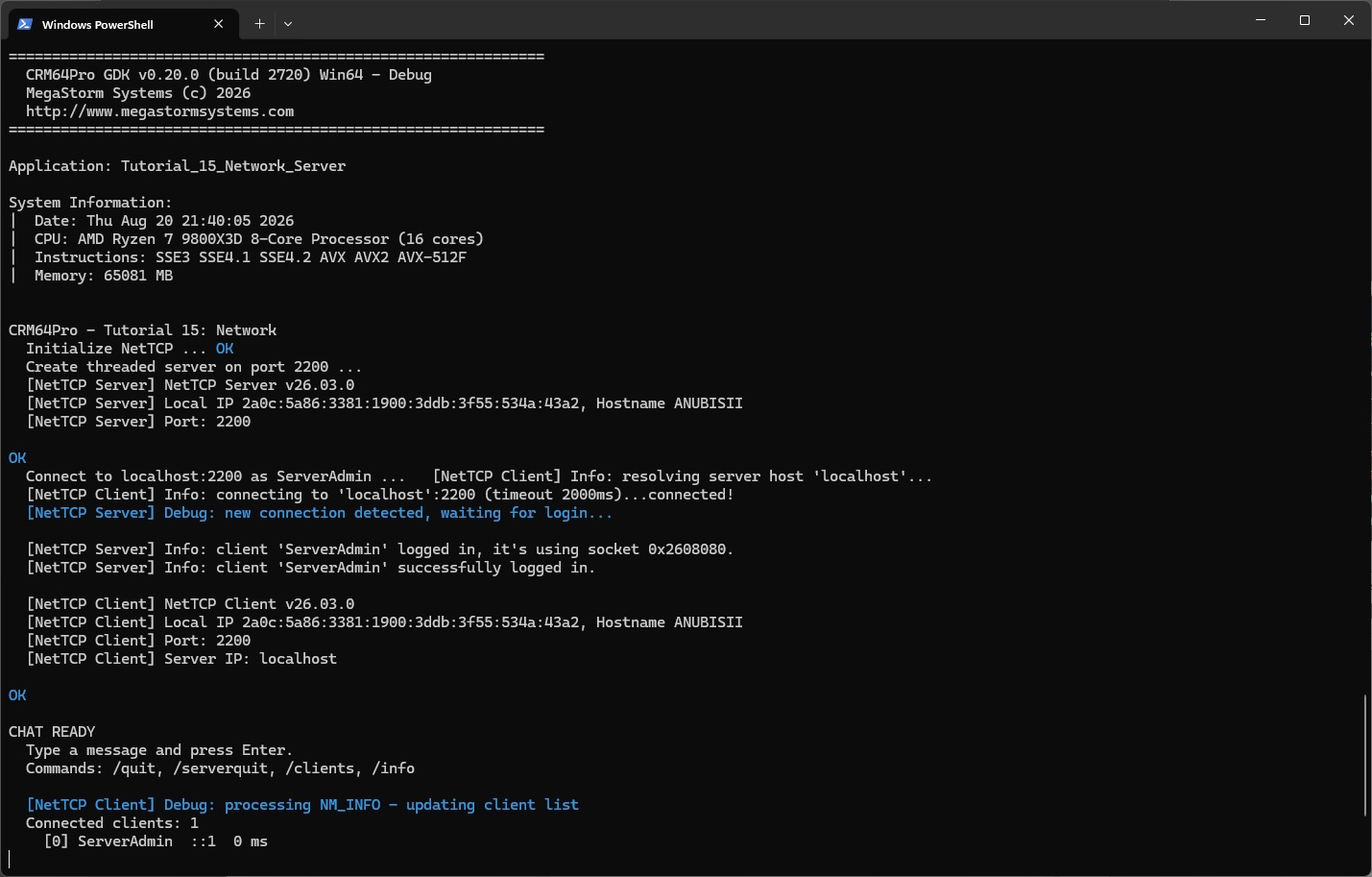
Start the server with Tutorial_15_Network -s, then connect clients with Tutorial_15_Network -c localhost Alice and Tutorial_15_Network -c localhost Bob.
/quit disconnects this process, /serverquit stops the server owned by this process in server mode, /clients requests the latest client table, /info prints diagnostics, and any other text is sent as a chat message.
Prerequisites
- CRM64Pro GDK installed and configured with a supported C++17 compiler.
- Tutorial package downloaded and fully extracted, preserving its folder structure.
- Three terminal windows for the complete example.
- TCP port
2200available on the server machine. - Permission for the executable to communicate through the local firewall.
What you will learn
- Initialize and close
NetTCP. - Create a threaded TCP server.
- Connect local and remote clients.
- Read console input without blocking receive polling.
- Send user payloads and process network events.
- Release payload memory returned by
receiveData().
Step by step
Step 1: Share only the running flag
The input and main threads share an atomic loop flag. Client name and mode are configured before either thread starts.
// Values shared between the network loop and the input thread.
struct TutorialState
{
    const char* szClientName = NETWORK_DEFAULT_NAME;
    SDL_AtomicInt iRunning;
    bool bServerMode = false;
};
The input thread never blocks on a terminal read. Windows polls with _kbhit() and _getch(); Linux and macOS use select() before fgets(). Both paths return while no full line is ready, allowing the thread to sleep briefly and keeping network receive polling responsive.
static bool readConsoleLine(char* szLine, Sint32 iMaxLen)
{
    if(!szLine || iMaxLen <= 1) return false;

#ifdef CRM64PRO_PLATFORM_WINDOWS
    // Windows consoles can be polled with _kbhit(). We build a small edit
    // buffer manually so this function never blocks the input thread.
    static char szEditLine[iInputMaxLen];
    static Sint32 iEditLen = 0;

    while(_kbhit())
    {
        const Sint32 iKey = _getch();
        if(iKey == '\r' || iKey == '\n')
        {
            putchar('\n');
            szEditLine[iEditLen] = '\0';
            snprintf(szLine, static_cast<size_t>(iMaxLen), "%s", szEditLine);
            iEditLen = 0;
            szEditLine[0] = '\0';
            return true;
        }
        if(iKey == '\b')
        {
            if(iEditLen > 0)
            {
                iEditLen--;
                szEditLine[iEditLen] = '\0';
                printf("\b \b");
                fflush(stdout);
            }
            continue;
        }
        if(iKey >= 32 && iKey < 127 && iEditLen < iMaxLen - 1)
        {
            szEditLine[iEditLen++] = static_cast<char>(iKey);
            szEditLine[iEditLen] = '\0';
            putchar(iKey);
            fflush(stdout);
        }
    }
    return false;
#else
    // On Linux and macOS, select() lets us check stdin before calling fgets().
    // This keeps the tutorial loop responsive even when the user is not typing.
    fd_set readfds;
    FD_ZERO(&readfds);
    FD_SET(STDIN_FILENO, &readfds);

    timeval tv;
    tv.tv_sec = 0;
    tv.tv_usec = 0;

    if(select(STDIN_FILENO + 1, &readfds, nullptr, nullptr, &tv) <= 0) return false;
    if(fgets(szLine, static_cast<int>(iMaxLen), stdin) == nullptr) return false;
    trimLineEnd(szLine);
    return true;
#endif
}
Step 2: Parse server and client modes
Server mode uses a fixed administrative name. Client mode reads the host and optional display name from the command line.
if(strcmp(argv[1], "-s") == 0)
{
    // Server mode creates the listening server and then joins it as a local
    // client named ServerAdmin.
    state.bServerMode = true;
    state.szClientName = NETWORK_SERVER_NAME;
    mLog.init("Tutorial_15_Network_Server", LL_DEBUG, LM_FILE | LM_STDOUT, OUTPUTDIR"Tutorial_15_Network_Server.log");
}
else if(strcmp(argv[1], "-c") == 0 && argc >= 3)
{
    // Client mode connects to the host passed after -c. The third argument
    // is optional and becomes the displayed chat name.
    state.bServerMode = false;
    szHost = argv[2];
    state.szClientName = (argc >= 4) ? argv[3] : NETWORK_DEFAULT_NAME;
    mLog.init("Tutorial_15_Network_Client", LL_DEBUG, LM_FILE | LM_STDOUT, OUTPUTDIR"Tutorial_15_Network_Client.log");
}
Step 3: Initialize the network system
NetTCP owns its worker threads and queues, so initialize it before creating either endpoint.
// NetTCP owns its worker threads and internal queues. Initialize it before
// creating a server or connecting a client.
mLog.msg(LL_INFO, "  Initialize NetTCP ... ");
if(mC64.netTCP().init(LM_FILE) != NR_OK)
{
    logTaskFailed(mLog);
    Main::terminate();
    return -1;
}
logTaskOk(mLog);
Step 4: Start the threaded server
Only server mode creates the listener. Connecting clients must use the same port and password.
if(state.bServerMode)
{
    // createServer() starts the threaded TCP server. The password must
    // match the value used by connecting clients.
    mLog.msg(LL_INFO, "  Create threaded server on port %d ... ", iServerPort);
    const eNetResult eRet = mC64.netTCP().createServer(iServerPort, NETWORK_PASSWORD, false);
    if(eRet != NR_OK)
    {
        logTaskFailed(mLog, eRet);
        mC64.netTCP().close();
        Main::terminate();
        return -1;
    }
    logTaskOk(mLog);
}
Step 5: Connect every process as a client
The server process also creates a local client, allowing all terminals to use the same chat path.
// The server process also connects a local client, so it can participate
// in the same chat flow as remote clients.
mLog.msg(LL_INFO, "  Connect to %s:%d as %s ... ", szHost, iServerPort, rState.szClientName);
const eNetResult eRet = mC64.netTCP().connectTo(szHost, iServerPort, rState.szClientName, NETWORK_PASSWORD);
if(eRet != NR_OK)
{
    logTaskFailed(mLog, eRet);
    return false;
}
logTaskOk(mLog);

// Ask for the initial client list. The result arrives through receiveData().
checkNetworkResult(mLog, "Initial client information request", mC64.netTCP().queryClientsInfo());
return true;
Step 6: Send raw message bytes
Format one chat line, send its byte length without the terminating null, and return the real queue result to the caller.
// Send a chat message to the connected peers.
static eNetResult sendChatMessage(const char* szClientName, const char* szText)
{
    if(!szClientName || !szText || szText[0] == '\0') return NR_BAD_PARAMETER;

    // NetTCP sends raw bytes. The tutorial formats one text line and sends the
    // string length without the terminating null character.
    char szMessage[iInputMaxLen + 32];
    snprintf(szMessage, sizeof(szMessage), "%s: %s", szClientName, szText);
    return Main::instance().netTCP().sendData(szMessage, static_cast<Sint32>(strlen(szMessage)));
}
Step 7: Handle commands in the input thread
Client requests are queued asynchronously, while server shutdown is local to the hosting process. Normal text is logged as sent only after sendData() accepts it.
if(strcmp(szLine, "/quit") == 0)
{
    // Close this client and exit the tutorial process.
    checkNetworkResult(mLog, "Client close request", Main::instance().netTCP().requestClientClose());
    setRunning(*pState, false);
}
else if(strcmp(szLine, "/serverquit") == 0)
{
    // Only the hosting process owns the server and can stop it.
    // Connected clients receive NM_CLOSE and leave their loops.
    checkNetworkResult(mLog, "Server close request", Main::instance().netTCP().requestServerClose());
}
else if(strcmp(szLine, "/clients") == 0)
{
    // Client information is requested asynchronously. The answer is
    // received later as NM_INFO and read with getClientsInfo().
    checkNetworkResult(mLog, "Client information request", Main::instance().netTCP().queryClientsInfo());
}
else if(strcmp(szLine, "/info") == 0)
{
    Main::instance().netTCP().info();
}
else
{
    if(checkNetworkResult(mLog, "Send message", sendChatMessage(pState->szClientName, szLine)))
    {
        mLog.msg(LL_INFO, "  Sending: %s\n", szLine);
    }
}
Step 8: Drain and release queued messages
Handle every currently available message before sleeping. Any returned payload must be released after use.
do
{
    // Drain all currently queued messages before sleeping. This avoids
    // displaying only one network event per loop tick.
    pData = nullptr;
    iSize = 0;
    eMsg = mC64.netTCP().receiveData(&pData, &iSize);
    if(eMsg != NM_NOTHING && eMsg != NM_PING)
    {
        handleNetworkMessage(rState, eMsg, pData, iSize);
    }
    // Payload memory belongs to NetTCP and must be released after use.
    if(pData) mC64.netTCP().freeData(pData);
} while(isRunning(rState) && eMsg != NM_NOTHING);
Step 9: Treat payloads as sized data
Network payloads are not assumed to be null-terminated. Use the received size when printing chat and client events. Handle close, information, delivery, and error events as control messages without assuming a payload exists.
This tutorial does not register an authoritative callback, so its own server does not send NM_DATA_ACCEPTED or NM_DATA_DENIED. The client also handles these replies when connected to an authoritative server.
case NM_CLOSE:
    mLog.msg(LL_INFO, "  Server closed the connection.\n");
    setRunning(rState, false);
    break;

case NM_NEWCLIENT:
    if(pData && iSize > 0)
        mLog.msg(LL_INFO, "  Client joined: %.*s\n", static_cast<Sint32>(iSize), static_cast<char*>(pData));
    else mLog.msg(LL_INFO, "  Client joined: unknown\n");
    break;

case NM_QUITCLIENT:
    if(pData && iSize > 0)
        mLog.msg(LL_INFO, "  Client left: %.*s\n", static_cast<Sint32>(iSize), static_cast<char*>(pData));
    else mLog.msg(LL_INFO, "  Client left: unknown\n");
    break;
case NM_INFO:
printClientTable();
break;
case NM_DATA:
if(pData && iSize > 0)
{
// Payloads are not assumed to be null-terminated. The %.*s format
// prints exactly the number of bytes received.
mLog.msg(LL_INFO, " %.*s\n", static_cast<Sint32>(iSize), static_cast<char*>(pData));
}
break;
// Only servers with an authoritative callback send these replies.
case NM_DATA_ACCEPTED:
mLog.msg(LL_DEBUG, " Message accepted by server.\n");
break;
case NM_DATA_DENIED:
mLog.msg(LL_INFO, " Message denied by server.\n");
break;
case NM_ERROR:
mLog.msg(LL_ERROR, " Network error. Closing client loop.\n");
setRunning(rState, false);
break;Step 10: Read the cached client table
getClientsInfo() returns a borrowed table. A successful zero-client result is valid and prints a count of zero.
// getClientsInfo() reads the latest client table cached by NetTCP.
Log& mLog = *Main::instance().logMgr().get();
if(!checkNetworkResult(mLog, "Read client information",
    Main::instance().netTCP().getClientsInfo(&pClients, &iCount)))
{
    return;
}

mLog.msg(LL_INFO, "  Connected clients: %d\n", iCount);
for(Sint32 i = 0; i < iCount; ++i)
{
    mLog.msg(LL_INFO, "    [%d] %s  %s  %d ms\n",
        pClients[i].iClientIdx,
        pClients[i].szName,
        pClients[i].ipAddress.szAddress[0] != '\0' ? pClients[i].ipAddress.szAddress : "N/A",
        pClients[i].iLatency);
}
Step 11: Join and close cleanly
Wait for the input thread before closing NetTCP, and propagate setup or shutdown failures to the executable result.
if(pInputThread)
{
    // Wait for the input thread before closing NetTCP.
    SDL_WaitThread(pInputThread, nullptr);
    pInputThread = nullptr;
}

return true;
mLog.msg(LL_INFO, "\nCLEANUP\n");
mLog.msg(LL_INFO, " Close NetTCP ... ");
const eNetResult eCloseResult = mC64.netTCP().close();
if(eCloseResult != NR_OK)
{
logTaskFailed(mLog, eCloseResult);
bSucceeded = false;
}
else logTaskOk(mLog);
Main::terminate();
return bSucceeded ? 0 : -1;Complete source
Use the source file as the authoritative version of this tutorial.
- View Tutorial_15_Network.cpp
- Server log:
Tutorial_15_Network_Server.log - Client log:
Tutorial_15_Network_Client.log - Default endpoint:
localhost:2200
Tutorial index
Next tutorial
Combine map objects, inventory and point-and-click movement.