

CRM64Pro Tutorial 14
Video playback.
Load a video with audio, preserve its aspect ratio inside a viewport, and control playback from the event loop.
Overview
This tutorial loads an external video through VideoMgr, reads its metadata, assigns the default screen as its render target and calculates an aspect-ratio-preserving viewport.
The event loop demonstrates play, pause, resume, stop, restart and relative seeking. Video audio uses the music tag, while a HUD displays playback state, timing, codecs and gain.
Final result
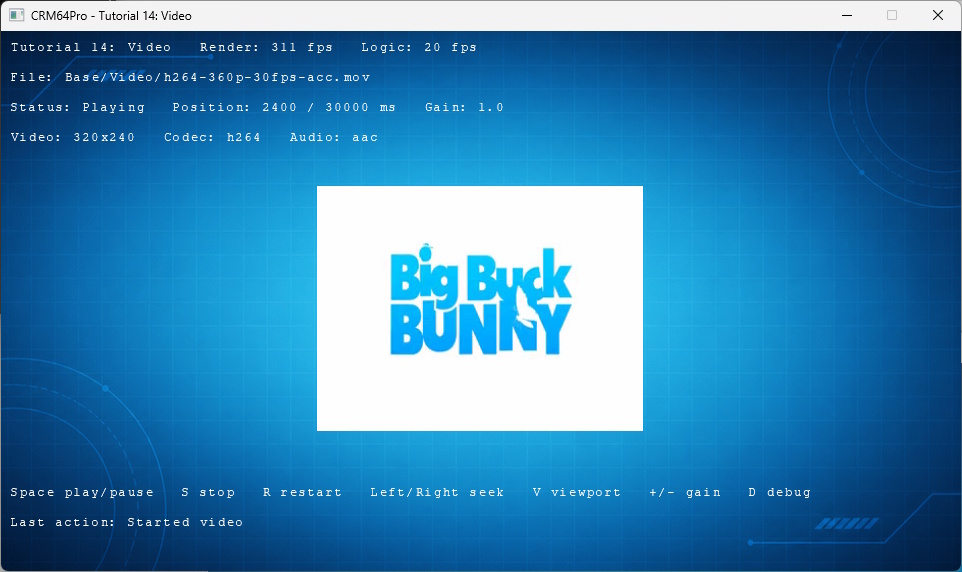
Space plays, pauses or resumes; S stops; R restarts; left and right seek by five seconds; V changes viewport size; minus and equals change gain; D toggles debug; grave toggles the console; and Q or ESC exits.
Prerequisites
- CRM64Pro GDK installed and configured with a supported C++17 compiler.
- Tutorial package downloaded and fully extracted, preserving its folder structure.
- Run Tutorials 02 and 04 so
Tutorial.cdccontains the background and cursor. - Included assets available under
bin/Base/:Video/h264-360p-30fps-acc.mov. - A working audio device and a renderer supported by the video subsystem.
What you will learn
- Initialize audio before loading video audio streams.
- Load media with
VideoMgr::loadFromFile(). - Read dimensions and codec metadata.
- Assign a target and aspect-ratio viewport.
- Control playback and relative seeking.
- Change video audio through the music tag gain.
Step by step
Step 1: Initialize video audio
Initialize audio before loading the media. This tutorial routes its video audio through the music tag.
mLog.msg(LL_INFO, "  Initialize audio ... ");
if(!mC64.configMgr().audioInit())
{
    logTaskFailed(mLog);
    Main::terminate();
    return -1;
}
logTaskOk(mLog);

// Video audio uses the music tag in this tutorial.
mC64.configMgr().audioSetMasterGain(1.0f);
mC64.configMgr().audioSetTagGain(ATT_MUSIC, state.fVideoGain);
Step 2: Load the video
VideoMgr owns the media object. Pass the music tag at load time and validate the borrowed pointer.
// VideoMgr owns the loaded media object. The returned Video pointer is borrowed.
mLog.msg(LL_INFO, "  Load video file: %s ... ", RESOURCE_VIDEO_FILE);
state.idVideo = mC64.videoMgr().loadFromFile(RESOURCE_VIDEO_FILE, "TutorialVideo", ATT_MUSIC);
Video* pVideo = mC64.videoMgr().get(state.idVideo);
if(state.idVideo < 0 || pVideo == nullptr)
{
    logTaskFailed(mLog, state.idVideo);
    Main::terminate();
    return -1;
}
logTaskOk(mLog);
Step 3: Read metadata
Store video dimensions and codec information for diagnostics and viewport placement.
// Metadata is useful for diagnostics and for deciding how to place the video.
mLog.msg(LL_INFO, "  Read video metadata ... ");
if(!pVideo->getInfo(&state.VI))
{
    logTaskFailed(mLog);
    Main::terminate();
    return -1;
}
logTaskOk(mLog);
Step 4: Preserve the aspect ratio
Fit the source dimensions inside the selected destination area, center the result, then assign the screen target and viewport.
// Keep the video aspect ratio while changing only the destination area.
static bool applyVideoViewport(Screen* pScreen, Video* pVideo, bool bLargeViewport)
{
    if(!pScreen || !pVideo) return false;

    const float fScreenW = static_cast<float>(pScreen->getWidth());
    const float fAreaX = bLargeViewport ? 30.0f : 120.0f;
    const float fAreaY = bLargeViewport ? 130.0f : 155.0f;
    const float fAreaW = fScreenW - (fAreaX * 2.0f);
    const float fAreaH = bLargeViewport ? 295.0f : 245.0f;
    const float fVideoW = static_cast<float>(pVideo->getWidth());
    const float fVideoH = static_cast<float>(pVideo->getHeight());

    if(fVideoW <= 0.0f || fVideoH <= 0.0f) return false;

    const float fScale = SDL_min(fAreaW / fVideoW, fAreaH / fVideoH);
    SDL_FRect rDst;
    rDst.w = fVideoW * fScale;
    rDst.h = fVideoH * fScale;
    rDst.x = fAreaX + ((fAreaW - rDst.w) * 0.5f);
    rDst.y = fAreaY + ((fAreaH - rDst.h) * 0.5f);

    return pVideo->setTarget() && pVideo->setViewport(&rDst);
}
Step 5: Start playback safely
Validate the initial play request so setup cannot report a running tutorial when playback failed.
mLog.msg(LL_INFO, "\nPLAYBACK\n");
mLog.msg(LL_INFO, "  Start video ... ");
if(pVideo->play(0) < 0)
{
    logTaskFailed(mLog);
    Main::terminate();
    return -1;
}
setLastAction(state, "Started video");
logTaskOk(mLog);
Step 6: Play, pause or resume
Choose the operation from the current status and update the HUD only with the real result.
// Start, pause, or resume the current video.
static void playPauseOrResume(Video* pVideo, TutorialState& rState)
{
    if(!pVideo) return;

    if(pVideo->status() == PS_PLAYING)
    {
        setLastAction(rState, pVideo->pause() ? "Paused video" : "Pause failed");
    }
    else if(pVideo->status() == PS_PAUSED)
    {
        setLastAction(rState, pVideo->resume() ? "Resumed video" : "Resume failed");
    }
    else
    {
        setLastAction(rState, pVideo->play(0) >= 0 ? "Started video" : "Play failed");
    }
}
Step 7: Seek within valid bounds
Clamp the requested position to the available duration and report a failed seek instead of displaying a false target.
// Move the video position by the requested time.
static void seekRelative(Video* pVideo, TutorialState& rState, Sint32 iDeltaMS)
{
    if(!pVideo) return;

    const Sint32 iDuration = pVideo->getDuration();
    Sint32 iTarget = pVideo->getPlaybackPosition() + iDeltaMS;
    if(iTarget < 0) iTarget = 0;
    if(iDuration > 0 && iTarget > iDuration) iTarget = iDuration;

    if(!pVideo->seek(iTarget))
    {
        setLastAction(rState, "Seek failed");
        return;
    }

    char szAction[128];
    snprintf(szAction, sizeof(szAction), "Seek to %d ms", iTarget);
    setLastAction(rState, szAction);
}
Step 8: Change the viewport transactionally
Calculate the requested mode first and commit it to tutorial state only after the video accepts the viewport.
else if(event.key.key == SDLK_V)
{
    const bool bLargeViewport = !state.bLargeViewport;
    if(applyVideoViewport(pScreen, pVideo, bLargeViewport))
    {
        state.bLargeViewport = bLargeViewport;
        setLastAction(state, state.bLargeViewport ? "Large viewport" : "Normal viewport");
    }
    else setLastAction(state, "Viewport change failed");
}
Step 9: Change tagged audio gain
Clamp gain to the supported range, then update the music tag used by this video.
else if(event.key.key == SDLK_MINUS)
{
    state.fVideoGain = clampGain(state.fVideoGain - fGainStep);
    mC64.configMgr().audioSetTagGain(ATT_MUSIC, state.fVideoGain);
    setLastAction(state, "Reduced video audio gain");
}
else if(event.key.key == SDLK_EQUALS)
{
    state.fVideoGain = clampGain(state.fVideoGain + fGainStep);
    mC64.configMgr().audioSetTagGain(ATT_MUSIC, state.fVideoGain);
    setLastAction(state, "Increased video audio gain");
}
Step 10: Finish cleanly
Exit before another state update, then close videos before shutting down audio.
if(!bRunning) break;
refreshRuntimeState(mC64, pVideo, state);
updateLogic(state);
mLog.msg(LL_INFO, " Close videos ... ");
mC64.videoMgr().close(0);
logTaskOk(mLog);
mLog.msg(LL_INFO, " Close audio ... ");
mC64.configMgr().audioClose();
logTaskOk(mLog);Complete source
Use the source file as the authoritative version of this tutorial.
- View Tutorial_14_Video.cpp
- Input video:
Base/Video/h264-360p-30fps-acc.mov - Input archive:
Tutorial.cdc - Log:
Tutorial_14_Video.log
Tutorial index