

CRM64Pro Tutorial 10
Particle effects.
Move a continuous emitter, switch built-in presets, spawn explosions, and test particle collision responses.
Overview
This tutorial introduces ParticleMgr and ParticleEmitter. A continuous emitter follows the mouse, number keys switch built-in presets, and left clicks create one-shot explosions.
A Physics rectangle demonstrates kill, stop and bounce responses while particles update at the fixed logic rate and render from the screen callback.
Final result
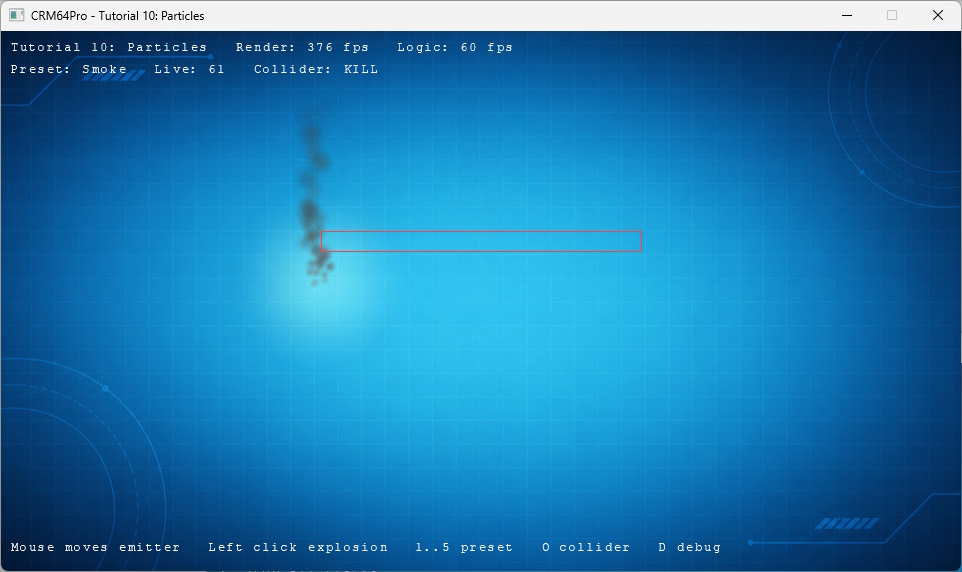
The mouse moves the emitter, left click creates an explosion, 1–5 select presets, O cycles collision modes, D toggles debug, grave toggles the console, and Q or ESC exits.
Prerequisites
- CRM64Pro GDK installed and configured with a supported C++17 compiler.
- Tutorial package downloaded and fully extracted, preserving its folder structure.
- Run Tutorials 02 and 04 so
Tutorial.cdccontains the background and cursor. - Write access to the platform output directory for the log.
What you will learn
- Create and configure a
ParticleEmitter. - Apply built-in particle presets.
- Bind a Physics collision set.
- Select particle collision responses.
- Update and render
ParticleMgrseparately. - Create self-closing one-shot effects.
Step by step
Step 1: Load the shared cursor
Load and select the cursor created earlier, keeping its existing default hotspot.
mLog.msg(LL_INFO, "  Load cursor from CDC ... ");
state.idCursor = mC64.cursorMgr().load(OUTPUT_CDC, RESOURCE_CURSOR_CDC_NAME);
Cursor* pCursor = mC64.cursorMgr().get(state.idCursor);
if(state.idCursor < 0 || pCursor == nullptr)
{
    logTaskFailed(mLog, state.idCursor);
    Main::terminate();
    return -1;
}
logTaskOk(mLog);

mLog.msg(LL_INFO, "  Select cursor ... ");
if(mC64.cursorMgr().select(state.idCursor) < 0 || !mC64.cursorMgr().show())
{
    logTaskFailed(mLog);
    Main::terminate();
    return -1;
}
logTaskOk(mLog);
Step 2: Define the available presets
A small table maps keys 1–5 to each built-in preset and its HUD label.
static const TutorialPreset g_Presets[] =
{
    { PEP_FIRE, "Fire" },
    { PEP_SMOKE, "Smoke" },
    { PEP_SNOW, "Snow" },
    { PEP_SPARKS, "Sparks" },
    { PEP_SPELL_AURA, "Spell aura" }
};
Step 3: Create the emitter and collider
ParticleMgr creates the emitter. Physics owns the rectangle shared with the continuous emitter and one-shots.
state.idEmitter = mC64.particleMgr().create("TutorialMouseEmitter");
state.idCollisionSet = mC64.physics().createCollisionSet("TutorialParticleCollider");
const Sint32 idCollider = mC64.physics().addColliderRectangle(state.idCollisionSet,
    TUTORIAL_COLLIDER_X, TUTORIAL_COLLIDER_Y, TUTORIAL_COLLIDER_W, TUTORIAL_COLLIDER_H);
if(state.idEmitter <= 0 || state.idCollisionSet <= 0 || idCollider <= 0
    || getEmitter(state) == nullptr || !applyPreset(state, 0))
{
    logTaskFailed(mLog, state.idEmitter);
    Main::terminate();
    return -1;
}
logTaskOk(mLog);
Step 4: Apply a preset completely
The selected index changes only after the complete emitter configuration succeeds.
// Apply the selected particle preset.
static bool applyPreset(TutorialState& rState, Sint32 iPreset)
{
    if(iPreset < 0 || iPreset >= static_cast<Sint32>(sizeof(g_Presets) / sizeof(g_Presets[0]))) return false;

    ParticleEmitter* pEmitter = getEmitter(rState);
    if(!pEmitter) return false;

    if(!pEmitter->applyPreset(g_Presets[iPreset].ePreset)
       || !pEmitter->setMaxParticles(1600)
       || !pEmitter->setPosition(rState.fMouseX, rState.fMouseY)
       || !pEmitter->setCollisionSet(rState.idCollisionSet)
       || !pEmitter->setCollisionMode(rState.eCollisionMode, 0.75f)
       || !pEmitter->play()) return false;

    rState.iPreset = iPreset;
    return true;
}
Step 5: Change collision response safely
The next mode is applied before the state changes, keeping the HUD synchronized if configuration fails.
// Cycle the tutorial particle collision response.
static bool cycleCollisionMode(TutorialState& rState)
{
    eParticleCollisionMode eMode;
    switch(rState.eCollisionMode)
    {
    case PCM_NONE: eMode = PCM_KILL; break;
    case PCM_KILL: eMode = PCM_STOP; break;
    case PCM_STOP: eMode = PCM_BOUNCE; break;
    default: eMode = PCM_NONE; break;
    }

    ParticleEmitter* pEmitter = getEmitter(rState);
    if(!pEmitter || !pEmitter->setCollisionMode(eMode, 0.75f)) return false;
    rState.eCollisionMode = eMode;
    return true;
}
Step 6: Update particles at the logic rate
Move the continuous emitter, then advance every particle emitter with the engine’s current logic delta.
// Update the tutorial state for the current frame.
static void updateLogic(TutorialState& rState, float fDeltaTime)
{
    ParticleEmitter* pEmitter = getEmitter(rState);
    if(pEmitter) pEmitter->setPosition(rState.fMouseX, rState.fMouseY);
    Main::instance().particleMgr().update(fDeltaTime);
    rState.iLogicFrames++;
}
Step 7: Render particles from the callback
Draw the background, glow, particles, collider outline and HUD in that order.
// Draw the tutorial frame for the current state.
static void renderFrame(Image* pBgImage, Font* pFont, TutorialState& rState)
{
    if(pBgImage) pBgImage->render();

    Main& mC64 = Main::instance();
    mC64.gfx().drawGlow(rState.fMouseX, rState.fMouseY, 96.0f, 255, 150, 40, 120, 0.55f);
    mC64.particleMgr().render();
    renderCollider(mC64, rState.eCollisionMode);
    renderHUD(pFont, rState);
}
Step 8: Select presets and collider modes
Preset and collision changes are reported only after successful configuration.
else if(event.key.key >= SDLK_1 && event.key.key <= SDLK_5)
{
    const Sint32 iPreset = static_cast<Sint32>(event.key.key - SDLK_1);
    if(applyPreset(state, iPreset))
        mLog.msg(LL_INFO, "  Preset: %s\n", g_Presets[state.iPreset].szName);
    else
        mLog.msg(LL_ERROR, "  Preset change failed\n");
}
else if(event.key.key == SDLK_D)
{
    toggleDebugWindow(pDebug);
}
else if(event.key.key == SDLK_O && cycleCollisionMode(state))
{
    mLog.msg(LL_INFO, "  Collider: %s\n", getCollisionModeName(state.eCollisionMode));
}
Step 9: Create explosion one-shots
playOneShot() creates and starts a temporary emitter, which receives the same collider configuration when available.
else if(event.type == SDL_EVENT_MOUSE_BUTTON_DOWN && event.button.button == SDL_BUTTON_LEFT)
{
    const Sint32 idOneShot = mC64.particleMgr().playOneShot(
        PEP_EXPLOSION, event.button.x, event.button.y);
    ParticleEmitter* pOneShot = mC64.particleMgr().get(idOneShot);
    if(pOneShot)
    {
        pOneShot->setCollisionSet(state.idCollisionSet);
        pOneShot->setCollisionMode(state.eCollisionMode, 0.75f);
    }
}
Step 10: Finish the loop cleanly
A quit request exits before another particle update.
if(!bRunning) break;
state.fMouseX = mC64.cursorMgr().getX();
state.fMouseY = mC64.cursorMgr().getY();
state.iCurrentRenderRate = static_cast<Sint32>(mC64.timer().getCurrentRFR());
state.iCurrentLogicRate = static_cast<Sint32>(mC64.timer().getCurrentLFR());
updateLogic(state, mC64.getLogicDeltaTime());
Step 11: Close emitters before physics
Emitters refer to the collision set, so close them before destroying it.
mLog.msg(LL_INFO, "  Close particle emitters ... ");
mC64.particleMgr().close(0);
logTaskOk(mLog);
mLog.msg(LL_INFO, "  Close particle collider ... ");
if(mC64.physics().closeCollisionSet(state.idCollisionSet) < 0) logTaskFailed(mLog);
else logTaskOk(mLog);
Complete source
Use the source file as the authoritative version of this tutorial.
- View Tutorial_10_Particles.cpp
- Input archive:
Tutorial.cdc - Runtime resources:
TutorialMouseEmitter,TutorialParticleCollider - Log:
Tutorial_10_Particles.log
Tutorial index