

CRM64Pro Tutorial 09
Audio playback.
Package several audio formats, mix looping music with sound effects, and control playback by track or tag.
Overview
This tutorial extends Tutorial 08 with AudioTrack resources. It packages MP3, WAV, FLAC and OGG files into Tutorial.cdc, loads them back, and mixes looping music with sound effects.
The example also demonstrates track tags, fading, global playback controls and mixer master gain.
Final result
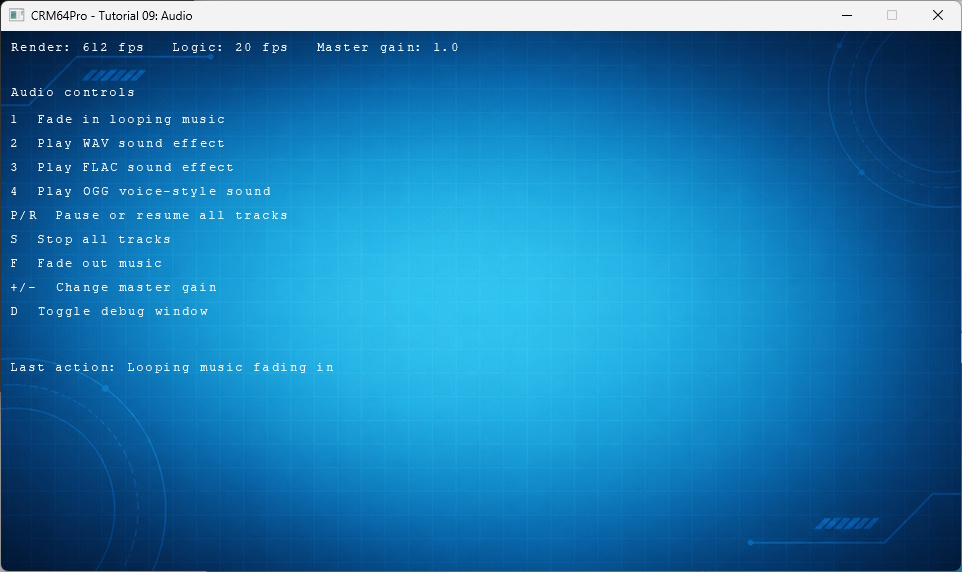
1 fades in looping music; 2, 3 and 4 play WAV, FLAC and OGG tracks; P/R pause or resume all tracks; S stops all tracks; F fades out music; plus/minus changes master gain; D toggles debug; grave toggles the console; and Q or ESC exits.
Prerequisites
- CRM64Pro GDK installed and configured with a supported C++17 compiler.
- Tutorial package downloaded and fully extracted, preserving its folder structure.
- Run Tutorials 02 and 04 so
Tutorial.cdccontains the background and cursor. - Included assets available under
bin/Base/:music.mp3,music.wav,music.flac,music.ogg. - A working audio output device and write access to the output directory.
What you will learn
- Initialize and close the audio device.
- Load and save
AudioTrackresources. - Retain source bytes temporarily for CDC packaging.
- Use music, sound-effect and voice tags.
- Fade, pause, resume and stop playback.
- Change mixer master gain.
Step by step
Step 1: Initialize the audio device
Open the mixer before loading or playing any tracks.
mLog.msg(LL_INFO, "  Initialize audio device ... ");
if(!mC64.configMgr().audioInit())
{
    logTaskFailed(mLog);
    Main::terminate();
    return -1;
}
logTaskOk(mLog);
Step 2: Verify the shared archive
The audio resources extend the archive created earlier. Source bytes are retained only while external tracks are packaged.
mLog.msg(LL_INFO, "  Find Tutorial 04 CDC: %s ... ", OUTPUT_CDC);
if(!mC64.tool().fileExists(OUTPUT_CDC))
{
    logTaskFailed(mLog);
    return false;
}
logTaskOk(mLog);

// Keep raw source bytes only while packaging the tracks into the CDC.
mAudioMgr.setKeepSourceData(true);
Step 3: Save a loaded track
AudioTrack::save() needs the retained source bytes. The helper validates each track before writing it.
// Save an audio track to the tutorial archive.
static bool saveAudioTrackToCDC(AudioTrackMgr& mAudioMgr, Log& mLog, Sint32 idTrack, const char* szResourceName)
{
    AudioTrack* pTrack = mAudioMgr.get(idTrack);
    if(idTrack < 0 || pTrack == nullptr)
    {
        logTaskFailed(mLog, idTrack);
        return false;
    }

    if(pTrack->save(OUTPUT_CDC, szResourceName) < 0)
    {
        logTaskFailed(mLog);
        return false;
    }

    logTaskOk(mLog);
    return true;
}
Step 4: Package tracks by format and tag
Each file receives a stable CDC name and a playback tag. These examples show the music and voice resources; WAV and FLAC follow the same source pattern.
mLog.msg(LL_INFO, "  Load music track: %s ... ", RESOURCE_AUDIO_MUSIC_FILE);
Sint32 idMusicFile = mAudioMgr.loadFromFile(RESOURCE_AUDIO_MUSIC_FILE, RESOURCE_AUDIO_MUSIC_CDC_NAME, ATT_MUSIC, ALM_PRELOAD);
if(idMusicFile < 0)
{
    logTaskFailed(mLog, idMusicFile);
    closeTemporaryAudioTracks(mAudioMgr);
    return false;
}
logTaskOk(mLog);

mLog.msg(LL_INFO, "  Save music track to CDC ... ");
if(!saveAudioTrackToCDC(mAudioMgr, mLog, idMusicFile, RESOURCE_AUDIO_MUSIC_CDC_NAME))
{
    closeTemporaryAudioTracks(mAudioMgr);
    return false;
}
mLog.msg(LL_INFO, " Load OGG voice-style sound: %s ... ", RESOURCE_AUDIO_VOICE_FILE);
Sint32 idVoiceFile = mAudioMgr.loadFromFile(RESOURCE_AUDIO_VOICE_FILE, RESOURCE_AUDIO_VOICE_CDC_NAME, ATT_VOICE, ALM_PRELOAD);
if(idVoiceFile < 0)
{
logTaskFailed(mLog, idVoiceFile);
closeTemporaryAudioTracks(mAudioMgr);
return false;
}
logTaskOk(mLog);
mLog.msg(LL_INFO, " Save OGG voice-style sound to CDC ... ");
if(!saveAudioTrackToCDC(mAudioMgr, mLog, idVoiceFile, RESOURCE_AUDIO_VOICE_CDC_NAME))
{
closeTemporaryAudioTracks(mAudioMgr);
return false;
}Step 5: Release temporary source data
Close the packaging tracks and restore the default memory policy before loading runtime copies.
// Close the tracks opened for temporary processing.
static void closeTemporaryAudioTracks(AudioTrackMgr& mAudioMgr)
{
    mAudioMgr.close(0);
    mAudioMgr.setKeepSourceData(false);
}
mLog.msg(LL_INFO, " Close temporary audio tracks ... ");
closeTemporaryAudioTracks(mAudioMgr);
logTaskOk(mLog);Step 6: Load runtime tracks from CDC
The helper loads each named resource and confirms that its track is available.
// Load an audio track from the tutorial archive.
static bool loadAudioTrackFromCDC(AudioTrackMgr& mAudioMgr, Log& mLog, Sint32& rIDTrack, const char* szResourceName)
{
    rIDTrack = mAudioMgr.load(OUTPUT_CDC, szResourceName);
    if(rIDTrack < 0 || mAudioMgr.get(rIDTrack) == nullptr)
    {
        logTaskFailed(mLog, rIDTrack);
        return false;
    }
    logTaskOk(mLog);
    return true;
}
Step 7: Play individual tracks
Music fades in with infinite looping. Other controls call play() through a result-checking helper.
// Play a track and record the requested action.
static void playTrack(AudioTrackMgr& mAudioMgr, Log& mLog, TutorialState& rState, Sint32 idTrack, const char* szAction)
{
    AudioTrack* pTrack = mAudioMgr.get(idTrack);
    if(!pTrack)
    {
        mLog.msg(LL_ERROR, "  Audio track not loaded\n");
        setLastAction(rState, "Audio track not loaded");
        return;
    }

    if(pTrack->play() == 0)
    {
        setLastAction(rState, szAction);
        mLog.msg(LL_INFO, "  %s\n", szAction);
    }
    else
    {
        setLastAction(rState, "Playback failed");
        mLog.msg(LL_ERROR, "  Playback failed\n");
    }
}
else if(event.key.key == SDLK_1)
{
AudioTrack* pMusic = mAudioMgr.get(state.idMusic);
if(pMusic && pMusic->fadeIn(700, -1) == 0)
{
setLastAction(state, "Looping music fading in");
mLog.msg(LL_INFO, " Looping music fading in\n");
}
else
{
setLastAction(state, "Music playback failed");
mLog.msg(LL_ERROR, " Music playback failed\n");
}
}Step 8: Control tracks globally and by tag
The manager controls all tracks together, while the music tag limits fade-out to music.
else if(event.key.key == SDLK_P)
{
    mAudioMgr.pauseAll();
    setLastAction(state, "All tracks paused");
    mLog.msg(LL_INFO, "  All tracks paused\n");
}
else if(event.key.key == SDLK_R)
{
    mAudioMgr.resumeAll();
    setLastAction(state, "All tracks resumed");
    mLog.msg(LL_INFO, "  All tracks resumed\n");
}
else if(event.key.key == SDLK_S)
{
    mAudioMgr.stopAll();
    setLastAction(state, "All tracks stopped");
    mLog.msg(LL_INFO, "  All tracks stopped\n");
}
else if(event.key.key == SDLK_F)
{
if(mAudioMgr.fadeOutTag(ATT_MUSIC, 1200))
{
setLastAction(state, "Music fading out");
mLog.msg(LL_INFO, " Music fading out\n");
}
else
{
setLastAction(state, "Music fade-out failed");
mLog.msg(LL_ERROR, " Music fade-out failed\n");
}
}Step 9: Change master gain
Plus and minus clamp mixer gain to the documented 0.0-2.0 range.
else if(event.key.key == SDLK_PLUS || event.key.key == SDLK_KP_PLUS)
{
    state.fMasterGain += 0.1f;
    if(state.fMasterGain > 2.0f) state.fMasterGain = 2.0f;
    mC64.configMgr().audioSetMasterGain(state.fMasterGain);
    setLastAction(state, "Master gain increased");
    mLog.msg(LL_INFO, "  Master gain: %.1f\n", state.fMasterGain);
}
else if(event.key.key == SDLK_MINUS || event.key.key == SDLK_KP_MINUS)
{
    state.fMasterGain -= 0.1f;
    if(state.fMasterGain < 0.0f) state.fMasterGain = 0.0f;
    mC64.configMgr().audioSetMasterGain(state.fMasterGain);
    setLastAction(state, "Master gain decreased");
    mLog.msg(LL_INFO, "  Master gain: %.1f\n", state.fMasterGain);
}
Step 10: Finish the loop cleanly
A quit request exits before another state update.
if(!bRunning) break;
state.fMouseX = mC64.cursorMgr().getX();
state.fMouseY = mC64.cursorMgr().getY();
state.iCurrentRenderRate = static_cast<Sint32>(mC64.timer().getCurrentRFR());
state.iCurrentLogicRate = static_cast<Sint32>(mC64.timer().getCurrentLFR());
updateLogic(state);
Step 11: Stop playback before closing audio
Tracks are stopped and closed before the mixer device.
mLog.msg(LL_INFO, "  Stop and close audio tracks ... ");
mAudioMgr.stopAll();
mAudioMgr.close(0);
logTaskOk(mLog);
mLog.msg(LL_INFO, "  Close audio device ... ");
mC64.configMgr().audioClose();
logTaskOk(mLog);
Complete source
Use the source file as the authoritative version of this tutorial.
- View Tutorial_09_Audio.cpp
- Assets:
music.mp3,music.wav,music.flac,music.ogg - Input/output archive:
Tutorial.cdc - Resources:
Tutorial_audio_music,_sfx,_flac,_voice - Log:
Tutorial_09_Audio.log
Tutorial index