

CRM64Pro Tutorial 06
GFX drawing.
Draw immediate primitives, filter image copies, inspect pixels, and combine images with additive glow helpers.
Overview
This tutorial extends Tutorial 05 with immediate GFX drawing, image filters, pixel access and additive glow helpers.
It mixes these operations with normal Image and Font rendering in one screen callback. No new CDC resources are created.
Final result
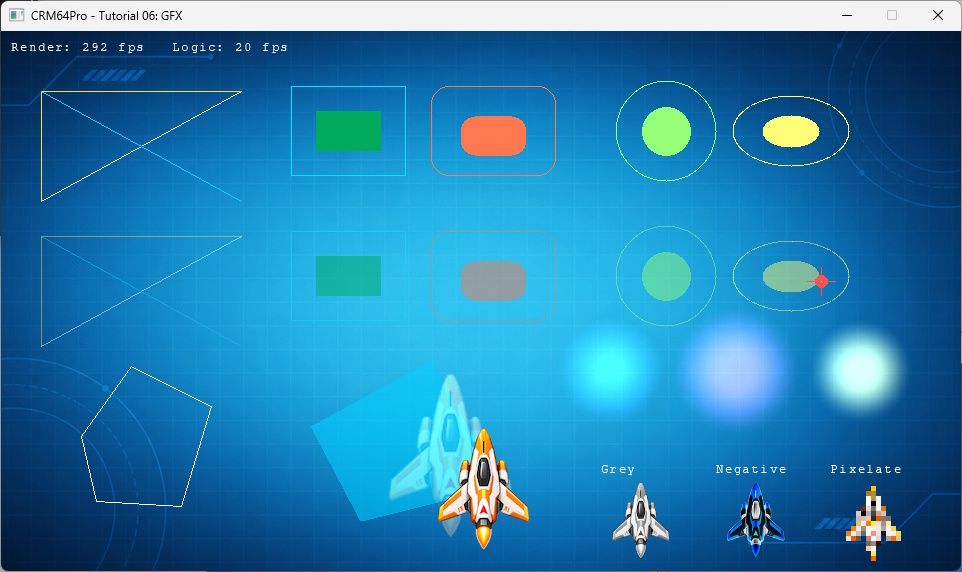
Cursor keys move the ship, G reads the pixel under the cursor, a mouse click reads the clicked pixel, D toggles the debug window, grave (`) toggles the console, and Q or ESC exits.
Prerequisites
- CRM64Pro GDK installed and configured with a supported C++17 compiler.
- Tutorial package downloaded and fully extracted, preserving its folder structure.
- Run Tutorials 02 and 04 so
Tutorial.cdccontains the background, ship and cursor. - Complete Tutorial 05 or understand its callback and built-in font usage.
What you will learn
- Access immediate drawing through
Main::gfx(). - Draw lines, rectangles, circles, ellipses and polygons.
- Draw translucent primitives with alpha.
- Duplicate images and apply filters.
- Read pixels with
GFX::getPixel(). - Use glow, radial-glow, flash and image-glow helpers.
Step by step
Step 1: Load the shared resources
Tutorial 06 adds no new CDC blocks. ImageMgr loads the existing resources by the stable names established earlier.
// Tutorial 06 does not add new resources. It uses the CDC built by previous tutorials.
mLog.msg(LL_INFO, "  Load background image from CDC ... ");
state.idBgImage = mC64.imageMgr().load(OUTPUT_CDC, RESOURCE_BG_CDC_NAME);
if(state.idBgImage < 0)
{
    logTaskFailed(mLog, state.idBgImage);
    Main::terminate();
    return -1;
}
logTaskOk(mLog);

mLog.msg(LL_INFO, "  Load ship image from CDC ... ");
state.idPlayerImage = mC64.imageMgr().load(OUTPUT_CDC, RESOURCE_PLAYER_CDC_NAME);
if(state.idPlayerImage < 0)
{
    logTaskFailed(mLog, state.idPlayerImage);
    Main::terminate();
    return -1;
}
logTaskOk(mLog);
Step 2: Draw primitive rows
The same helper draws one opaque row and one translucent row by changing only the alpha argument.
// Draw one row of graphics primitive samples.
static void renderPrimitiveRow(float fOffsetY, Uint8 iAlpha)
{
    GFX& mGFX = Main::instance().gfx();

    // Lines.
    mGFX.lineH(40, 240, 60 + fOffsetY, 255, 220, 80, iAlpha);
    mGFX.lineV(40, 60 + fOffsetY, 170 + fOffsetY, 255, 220, 80, iAlpha);
    mGFX.line(40, 170 + fOffsetY, 240, 60 + fOffsetY, 255, 255, 255, iAlpha);
    mGFX.line(40, 60 + fOffsetY, 240, 170 + fOffsetY, 0, 210, 255, iAlpha);

    // Rectangles.
    mGFX.rect(290, 55 + fOffsetY, 405, 145 + fOffsetY, 0, 230, 255, iAlpha);
    mGFX.rectFilled(315, 80 + fOffsetY, 380, 120 + fOffsetY, 0, 170, 90, iAlpha);
    mGFX.rectRound(430, 55 + fOffsetY, 555, 145 + fOffsetY, 18, 255, 120, 80, iAlpha);
    mGFX.rectFilledRound(460, 85 + fOffsetY, 525, 125 + fOffsetY, 14, 255, 120, 80, iAlpha);

    // Circles and ellipses.
    mGFX.circle(665, 100 + fOffsetY, 50, 150, 255, 120, iAlpha);
    mGFX.circleFilled(665, 100 + fOffsetY, 24, 150, 255, 120, iAlpha);
    mGFX.ellipse(790, 100 + fOffsetY, 58, 35, 255, 255, 120, iAlpha);
    mGFX.ellipseFilled(790, 100 + fOffsetY, 28, 16, 255, 255, 120, iAlpha);
}
Step 3: Add polygons, a marker and glows
Polygon helpers use parallel coordinate arrays. The marker combines a filled circle, lines and one pixel, while additive helpers provide decorative light effects.
// Polygon outline and filled polygon.
float fPolyX[5] = { 80.0f, 130.0f, 210.0f, 180.0f, 95.0f };
float fPolyY[5] = { 405.0f, 335.0f, 375.0f, 475.0f, 470.0f };
float fFillX[4] = { 310.0f, 430.0f, 500.0f, 360.0f };
float fFillY[4] = { 395.0f, 330.0f, 455.0f, 490.0f };
mGFX.polygon(fPolyX, fPolyY, 5, 255, 255, 255, 255);
mGFX.polygonFilled(fFillX, fFillY, 4, 0, 210, 255, 140);

// Marker uses pixel and circle drawing. Move it by clicking or pressing G.
mGFX.circleFilled(rState.fMarkerX, rState.fMarkerY, 6, 255, 80, 80, 255);
mGFX.lineH(rState.fMarkerX - 14.0f, rState.fMarkerX + 14.0f, rState.fMarkerY, 255, 80, 80, 255);
mGFX.lineV(rState.fMarkerX, rState.fMarkerY - 14.0f, rState.fMarkerY + 14.0f, 255, 80, 80, 255);
mGFX.setPixel(rState.fMarkerX, rState.fMarkerY, 255, 255, 255, 255);

// Additive helpers draw decorative light effects over the scene.
mGFX.drawGlow(610, 340, 58, 80, 180, 255, 160, 0.80f);
mGFX.drawRadialGlow(735, 340, 12, 68, 255, 100, 220, 170, 0.85f);
mGFX.drawFlash(860, 340, 54, 255, 235, 120, 210, 1.0f);
Step 4: Create filtered image copies
ImageMgr::duplicate() leaves the original ship unchanged. A failed filter reports its own error and closes the temporary copy.
// Create an image resource with the selected filter.
static bool createFilteredImage(Main& mC64, Log& mLog, Sint32 idSource, const char* szName, eImageFilter eFilter, Sint32 iValue, Sint32& rID)
{
    mLog.msg(LL_INFO, "  Create %s filter sample ... ", szName);
    rID = mC64.imageMgr().duplicate(idSource, szName);
    Image* pImage = mC64.imageMgr().get(rID);
    if(rID < 0 || pImage == nullptr)
    {
        logTaskFailed(mLog, rID);
        return false;
    }

    const Sint32 iRet = pImage->applyFilter(eFilter, iValue);
    if(iRet < 0)
    {
        logTaskFailed(mLog, iRet);
        mC64.imageMgr().close(rID);
        rID = -1;
        return false;
    }
    logTaskOk(mLog);
    return true;
}
mLog.msg(LL_INFO, "\nFILTERS: duplicate ship and apply filters\n");
if(!createFilteredImage(mC64, mLog, state.idPlayerImage, "TutorialFilterGrey", IF_GREY, 0, state.idFilterGrey) ||
!createFilteredImage(mC64, mLog, state.idPlayerImage, "TutorialFilterNegative", IF_NEGATIVE, 0, state.idFilterNegative) ||
!createFilteredImage(mC64, mLog, state.idPlayerImage, "TutorialFilterPixelate", IF_PIXELATE, 8, state.idFilterPixelate))
{
Main::terminate();
return -1;
}Step 5: Select the custom cursor
Select the loaded cursor and make it visible.
mLog.msg(LL_INFO, "  Select cursor ... ");
if(mC64.cursorMgr().select(state.idCursor) < 0 ||
   !mC64.cursorMgr().show())
{
    logTaskFailed(mLog);
    Main::terminate();
    return -1;
}
logTaskOk(mLog);
Step 6: Mix immediate and resource rendering
The callback draws the background and primitives, places a glow behind the ship, renders the ship, then finishes with filtered images and text.
// Draw the current frame. CursorMgr draws the selected cursor automatically.
static void renderFrame(Image* pBgImage, Image* pPlayerImage, Font* pBuiltInFont, const TutorialState& rState)
{
    if(pBgImage) pBgImage->render();

    renderGFX(rState);

    if(pPlayerImage)
    {
        SDL_FRect rDst = {
            rState.fPlayerX,
            rState.fPlayerY,
            static_cast<float>(pPlayerImage->getWidth()),
            static_cast<float>(pPlayerImage->getHeight())
        };
        Main::instance().gfx().drawGlowImage(rState.idPlayerImage, rState.fPlayerX + 32.0f, rState.fPlayerY + 32.0f, 1.35f, 255, 180, 70, 130, 0.70f);
        pPlayerImage->render(0, nullptr, &rDst);
    }

    renderFilterSamples(pBuiltInFont, rState);
    renderRates(pBuiltInFont, rState);
}
Step 7: Read pixels at current coordinates
The G key queries CursorMgr immediately. Mouse clicks use their exact SDL event coordinates.
else if(event.key.key == SDLK_G)
{
    state.fMarkerX = mC64.cursorMgr().getX();
    state.fMarkerY = mC64.cursorMgr().getY();
    state.iLastPixel = mC64.gfx().getPixel(state.fMarkerX, state.fMarkerY);
    mLog.msg(LL_INFO, "  Pixel at %.0f, %.0f: %#08x\n", state.fMarkerX, state.fMarkerY, state.iLastPixel);
}
else if(event.key.key == SDLK_D)
{
    toggleDebugWindow(pDebug);
}
else if(event.type == SDL_EVENT_MOUSE_BUTTON_DOWN)
{
state.fMarkerX = event.button.x;
state.fMarkerY = event.button.y;
state.iLastPixel = mC64.gfx().getPixel(state.fMarkerX, state.fMarkerY);
mLog.msg(LL_INFO, " Mouse clicked: button %d at %d, %d; pixel %#08x\n", event.button.button, (Sint32)event.button.x, (Sint32)event.button.y, state.iLastPixel);
}Step 8: Complete logic and cleanup
A quit request exits before the final update. Fonts and cursors close before images because those resources can own images.
if(!bRunning) break;
state.fMouseX = mC64.cursorMgr().getX();
state.fMouseY = mC64.cursorMgr().getY();
state.iCurrentRenderRate = static_cast<Sint32>(mC64.timer().getCurrentRFR());
state.iCurrentLogicRate = static_cast<Sint32>(mC64.timer().getCurrentLFR());
updateLogic(state, pPlayerImage, 1.0f / static_cast<float>(iLogicRate));
mLog.msg(LL_INFO, " Close fonts ... ");
mC64.fontMgr().close(0);
logTaskOk(mLog);
mLog.msg(LL_INFO, " Close cursors ... ");
mC64.cursorMgr().close(0);
logTaskOk(mLog);
mLog.msg(LL_INFO, " Close images ... ");
mC64.imageMgr().close(0);
logTaskOk(mLog);
mLog.msg(LL_INFO, " Close CDC archives ... ");
mC64.archiveMgr().close(0);
logTaskOk(mLog);
Main::terminate();Complete source
Use the source file as the authoritative version of this tutorial.
- View Tutorial_06_GFX.cpp
- Input archive:
Tutorial.cdc - Generated runtime images: grey, negative and pixelated ship copies.
- Log:
Tutorial_06_GFX.log
Tutorial index