

CRM64Pro Tutorial 05
Fonts.
Add a bitmap font to the shared CDC archive, compare the embedded fonts, and render positioned, scaled and colored text.
Overview
This tutorial extends Tutorial 04 with bitmap and built-in fonts. It adds a bitmap Font and its Image to the shared Tutorial.cdc, then reloads the runtime resources.
It demonstrates text positioning, a text cursor, scaling, color modulation, live frame-rate text and all embedded Arial and Courier New variants.
Final result
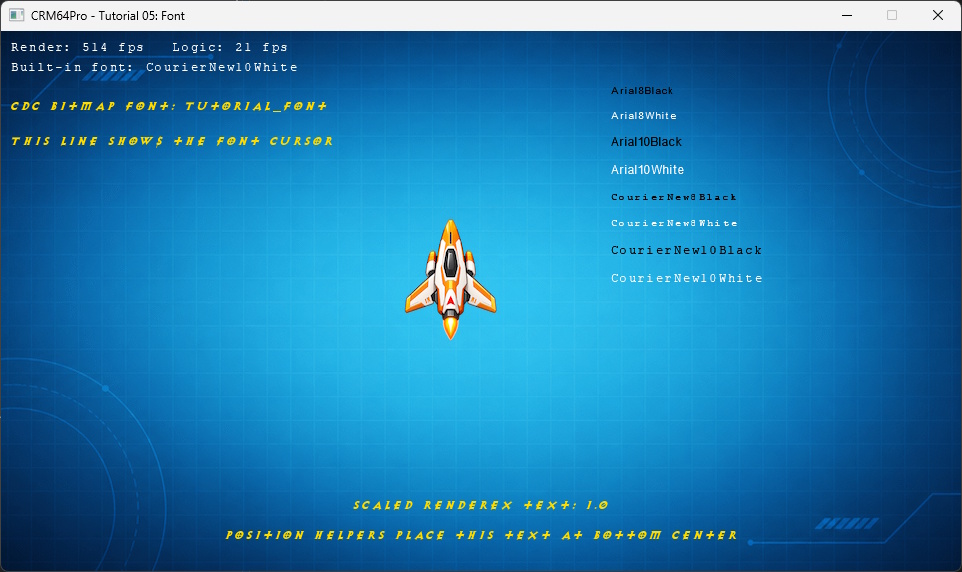
Cursor keys move the ship, plus and minus change the font scale, D toggles the debug window, grave (`) toggles the console, any key or mouse click is logged, and Q or ESC exits.
Prerequisites
- CRM64Pro GDK installed and configured with a supported C++17 compiler.
- Tutorial package downloaded and fully extracted, preserving its folder structure.
- Run Tutorials 02 and 04 first so
Tutorial.cdccontains the background, ship and cursor. - Included assets available under
bin/Base/:in_font.png. - Write access to the platform output directory.
What you will learn
- Create a
Fontfrom anImageand transfer image ownership. - Save and load a font resource through a CDC archive.
- Configure kerning, space width and the text cursor.
- Load embedded fonts with
FontMgr::getBuiltin(). - Position, scale and color text.
- Display current render and logic rates.
Step by step
Step 1: Verify the shared archive
Font::save() can create an archive, but this tutorial must extend the archive prepared earlier. The check prevents an incomplete font-only Tutorial.cdc.
// Tutorial 05 introduces one new resource. Earlier tutorials already added
// the background, ship and cursor to the CDC.
mLog.msg(LL_INFO, "  Find Tutorial 04 CDC: %s ... ", OUTPUT_CDC);
if(!mC64.tool().fileExists(OUTPUT_CDC))
{
    logTaskFailed(mLog);
    return false;
}
logTaskOk(mLog);
Step 2: Create a bitmap font
The image uses black as its transparent color. FontMgr creates an empty font, then assignImage() transfers ownership of the image. The tutorial configures its spacing and cursor character.
mLog.msg(LL_INFO, "  Load bitmap font image: %s ... ", RESOURCE_FONT_IMAGE);
Sint32 idFontImage = mC64.imageMgr().loadFromFile(RESOURCE_FONT_IMAGE, "tutorialFontImageFile");
Image* pFontImage = mC64.imageMgr().get(idFontImage);
if(idFontImage < 0 || pFontImage == nullptr)
{
    logTaskFailed(mLog, idFontImage);
    return false;
}
pFontImage->setColorKey(0, 0, 0);
logTaskOk(mLog);

mLog.msg(LL_INFO, "  Create font from image ... ");
Sint32 idFontFile = mC64.fontMgr().create(RESOURCE_FONT_CDC_NAME);
Font* pFontFile = mC64.fontMgr().get(idFontFile);
if(idFontFile < 0 || pFontFile == nullptr)
{
    logTaskFailed(mLog, idFontFile);
    mC64.imageMgr().close(idFontImage);
    return false;
}
if(pFontFile->assignImage(idFontImage, 1) < 0)
{
    logTaskFailed(mLog);
    mC64.fontMgr().close(idFontFile);
    mC64.imageMgr().close(idFontImage);
    return false;
}
pFontFile->setKerning(1);
pFontFile->setSpaceWidth(6);
pFontFile->setTextCursor('|');
logTaskOk(mLog);
Step 3: Save the font to Tutorial.cdc
Font::save() stores the font block and its owned image block. Closing the temporary font also releases the image before loading a fresh runtime copy.
// Save appends or replaces the font resource in Tutorial.cdc.
mLog.msg(LL_INFO, "  Save font to CDC ... ");
if(pFontFile->save(OUTPUT_CDC, RESOURCE_FONT_CDC_NAME) < 0)
{
    logTaskFailed(mLog);
    mC64.fontMgr().close(idFontFile);
    return false;
}
logTaskOk(mLog);

// Close the temporary font. The tutorial loads a fresh copy from CDC next.
mLog.msg(LL_INFO, "  Close temporary font ... ");
mC64.fontMgr().close(idFontFile);
logTaskOk(mLog);
Step 4: Load and select the custom cursor
Load the cursor from Tutorial.cdc, then select and show it.
mLog.msg(LL_INFO, "  Load cursor from CDC ... ");
state.idCursor = mC64.cursorMgr().load(OUTPUT_CDC, RESOURCE_CURSOR_CDC_NAME);
Cursor* pCursor = mC64.cursorMgr().get(state.idCursor);
if(state.idCursor < 0 || pCursor == nullptr)
{
    logTaskFailed(mLog, state.idCursor);
    Main::terminate();
    return -1;
}
logTaskOk(mLog);

mLog.msg(LL_INFO, "  Select cursor ... ");
if(mC64.cursorMgr().select(state.idCursor) < 0 ||
   !mC64.cursorMgr().show())
{
    logTaskFailed(mLog);
    Main::terminate();
    return -1;
}
logTaskOk(mLog);
Step 5: Load and color the bitmap font
A font renders through an image, so changing that image’s color modulation changes the rendered text color.
mLog.msg(LL_INFO, "  Load bitmap font from CDC ... ");
state.idBitmapFont = mC64.fontMgr().load(OUTPUT_CDC, RESOURCE_FONT_CDC_NAME);
Font* pBitmapFont = mC64.fontMgr().get(state.idBitmapFont);
if(state.idBitmapFont < 0 || pBitmapFont == nullptr)
{
    logTaskFailed(mLog, state.idBitmapFont);
    Main::terminate();
    return -1;
}
logTaskOk(mLog);

// Fonts use an Image internally. Image color modulation changes the rendered text color.
Image* pBitmapFontImage = mC64.imageMgr().get(pBitmapFont->getImage());
if(pBitmapFontImage) pBitmapFontImage->setColorMod(255, 220, 120);
Step 6: Load the embedded font set
FontMgr::getBuiltin() returns the requested embedded font. The tutorial loads one for status text and all eight variants for comparison.
mLog.msg(LL_INFO, "  Load built-in font ... ");
state.idBuiltInFont = mC64.fontMgr().getBuiltin("CourierNew10White");
Font* pBuiltInFont = mC64.fontMgr().get(state.idBuiltInFont);
if(state.idBuiltInFont < 0 || pBuiltInFont == nullptr)
{
    logTaskFailed(mLog, state.idBuiltInFont);
    Main::terminate();
    return -1;
}
logTaskOk(mLog);

// Preload every embedded font used by the visual comparison.
mLog.msg(LL_INFO, "  Load embedded font samples ... ");
for(Sint32 i = 0; i < iBuiltinSampleCount; ++i)
{
    state.idBuiltinSamples[i] = mC64.fontMgr().getBuiltin(szBuiltinSampleNames[i]);
    if(state.idBuiltinSamples[i] < 0 || mC64.fontMgr().get(state.idBuiltinSamples[i]) == nullptr)
    {
        logTaskFailed(mLog, state.idBuiltinSamples[i]);
        Main::terminate();
        return -1;
    }
}
logTaskOk(mLog);
Step 7: Render positioned and scaled text
The built-in font displays live frame rates. The bitmap font demonstrates normal rendering, its configured cursor, position helpers and renderEx() scaling.
// Draw text at the requested screen position.
static void renderText(Font* pBitmapFont, Font* pBuiltInFont, const TutorialState& rState)
{
    if(pBuiltInFont)
    {
        char szRates[96];
        snprintf(szRates, sizeof(szRates), "Render: %d fps   Logic: %d fps", rState.iCurrentRenderRate, rState.iCurrentLogicRate);
        pBuiltInFont->setPosition(10, 10);
        pBuiltInFont->render(szRates);

        pBuiltInFont->setPosition(10, 30);
        pBuiltInFont->render("Built-in font: CourierNew10White");
    }

    if(!pBitmapFont) return;

    pBitmapFont->setPosition(10, 70);
    pBitmapFont->render("CDC bitmap font: Tutorial_font");

    pBitmapFont->setPosition(10, 105);
    pBitmapFont->render("This line shows the font cursor", true, 14);

    char szScale[96];
    snprintf(szScale, sizeof(szScale), "Scaled renderEx text: %.1f", rState.fFontScale);
    pBitmapFont->setPosition(Position(PH_CENTER, 0), Position(PH_BOTTOM, -58));
    pBitmapFont->renderEx(szScale, false, -1, rState.fFontScale, rState.fFontScale);

    pBitmapFont->setPosition(Position(PH_CENTER, 0), Position(PH_BOTTOM, -28));
    pBitmapFont->render("Position helpers place this text at bottom center");
}
Step 8: Adjust scale and update live values
Plus and minus clamp the scale between 0.5 and 2.0. A quit request exits before the final state and logic update.
else if(event.key.key == SDLK_PLUS || event.key.key == SDLK_KP_PLUS)
{
    state.fFontScale = clampFloat(state.fFontScale + 0.1f, 0.5f, 2.0f);
}
else if(event.key.key == SDLK_MINUS || event.key.key == SDLK_KP_MINUS)
{
    state.fFontScale = clampFloat(state.fFontScale - 0.1f, 0.5f, 2.0f);
}
else if(event.key.key == SDLK_D)
{
    toggleDebugWindow(pDebug);
}
if(!bRunning) break;
state.fMouseX = mC64.cursorMgr().getX();
state.fMouseY = mC64.cursorMgr().getY();
state.iCurrentRenderRate = static_cast<Sint32>(mC64.timer().getCurrentRFR());
state.iCurrentLogicRate = static_cast<Sint32>(mC64.timer().getCurrentLFR());
updateLogic(state, pPlayerImage, 1.0f / static_cast<float>(iLogicRate));Step 9: Release resources in ownership order
Fonts and cursors can own images, so they are closed before ImageMgr and the CDC archives.
mLog.msg(LL_INFO, "  Close fonts ... ");
mC64.fontMgr().close(0);
logTaskOk(mLog);
mLog.msg(LL_INFO, "  Close cursors ... ");
mC64.cursorMgr().close(0);
logTaskOk(mLog);
mLog.msg(LL_INFO, "  Close images ... ");
mC64.imageMgr().close(0);
logTaskOk(mLog);
mLog.msg(LL_INFO, "  Close CDC archives ... ");
mC64.archiveMgr().close(0);
logTaskOk(mLog);
Main::terminate();
Complete source
Use the source file as the authoritative version of this tutorial.
- View Tutorial_05_Font.cpp
- Asset:
Base/in_font.png - Input/output archive:
Tutorial.cdc - Font resource:
Tutorial_font - Log:
Tutorial_05_Font.log
Tutorial index