

CRM64Pro Tutorial 16.5
Scene War Game.
Build a strategy map with weighted A* pathfinding, animated grid movement, manual camera scrolling, terrain diagnostics, and fog of war.
Final result
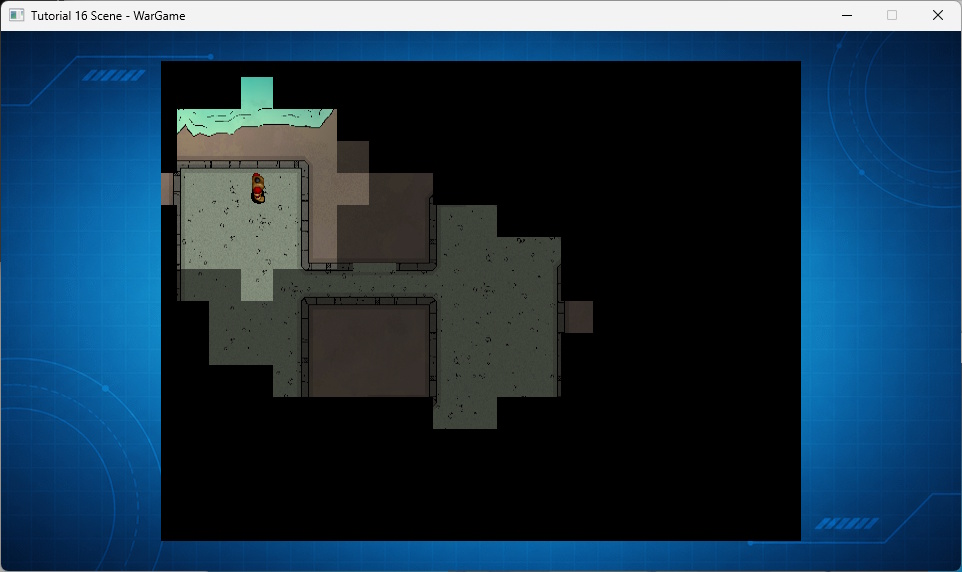
Right-click moves the player unit; cursor keys scroll the map; F1 toggles the grid and terrain weights; F2 toggles fog of war; and Q or ESC exits.
Prerequisites
- CRM64Pro GDK installed and configured with a supported C++17 compiler.
- Tutorial package downloaded and fully extracted, preserving its folder structure.
- Understand Scene tile layers and fixed-rate logic.
- Included assets available under
bin/Base/:map-war1.png,map-war1-heightmap.png,sprite.png. - Keep
Tutorial_bginTutorial.cdc.
What you will learn
- Import a visual map as a Scene tile layer.
- Build movement costs from a heightmap image.
- Find weighted eight-direction routes with A*.
- Render a smoothly moving sprite over a logical grid.
- Maintain visible and explored fog cells.
Step 1: Store grid and visual movement state
The unit keeps its current cell, destination, in-cell pixel offset, and current A* path.
struct Player
{
    Sint32 iIDSprite;
    Sint32 iX, iY;             // Grid coordinates (cells)
    float  fOffX, fOffY;       // Visual pixel offset from center of current cell
    Sint32 iTargetX, iTargetY; // Destination (grid cells)
    bool   bIsMoving;
    vector<SDL_Point> vPath;   // Path to follow (list of grid points)
    Sint32 iCurrentPathIndex;  // Current step in the path
};
Step 2: Order the A* open set
The priority queue places the node with the lowest estimated total cost first.
struct Node
{
    Sint32 iX, iY;
    float  fF, fG; // f = total cost (g + h), g = path cost from start
    // Reverse comparison so priority_queue selects the lowest cost first.
    bool operator<(const Node& rOther) const
    {
        return fF > rOther.fF;
    }
};
Step 3: Prepare the weighted search
Cost and predecessor grids cover the map. Eight directions allow cardinal and diagonal movement.
// Data structures for A*
priority_queue<Node> vOpenSet;
vector<vector<float>> vvfCostSoFar(iHeight, vector<float>(iWidth, -1.0f));
vector<vector<SDL_Point>> vvCameFrom(iHeight, vector<SDL_Point>(iWidth, { -1, -1 }));

// Start node
vOpenSet.push({ iStartX, iStartY, 0.0f, 0.0f });
vvfCostSoFar[iStartY][iStartX] = 0.0f;

// Directions (8-way movement: cardinal + diagonals)
const Sint32 iDirs[8][2] = { {0,1}, {1,0}, {0,-1}, {-1,0}, {1,1}, {1,-1}, {-1,1}, {-1,-1} };
Step 4: Expand cheaper routes
Blocked cells are skipped. Terrain weight and diagonal distance determine the accumulated cost.
Uint32 iWeight = pMap->iCellMap[iNY][iNX];
if(iWeight == 255) continue; // Unwalkable terrain

// Cost: grid distance (1.0 or 1.414 for diagonal) * terrain weight
float fDist = (rDir[0] != 0 && rDir[1] != 0) ? 1.414f : 1.0f;
float fNewCost = vvfCostSoFar[mCurrent.iY][mCurrent.iX] + (fDist * (float)iWeight);

if(vvfCostSoFar[iNY][iNX] == -1.0f || fNewCost < vvfCostSoFar[iNY][iNX])
{
    vvfCostSoFar[iNY][iNX] = fNewCost;
    float fPriority = fNewCost + (abs(iEndX - iNX) + abs(iEndY - iNY)); // Manhattan distance heuristic
    vOpenSet.push({ iNX, iNY, fPriority, fNewCost });
    vvCameFrom[iNY][iNX] = { mCurrent.iX, mCurrent.iY };
}
Step 5: Reconstruct the route
Predecessors are followed from the destination to the start, then reversed for movement.
if(vvCameFrom[iEndY][iEndX].x != -1)
{
    SDL_Point mCurr = { iEndX, iEndY };
    while(mCurr.x != iStartX || mCurr.y != iStartY)
    {
        vPath.push_back(mCurr);
        mCurr = vvCameFrom[mCurr.y][mCurr.x];
    }
    reverse(vPath.begin(), vPath.end());
}
Step 6: Convert the heightmap into costs
Each map cell samples the center of its source block. Red is blocked; grayscale becomes a movement weight.
// Sample the center of each tile.
Sint32 iPX = iX * g_pState->iTileSize + (g_pState->iTileSize / 2);
Sint32 iPY = iY * g_pState->iTileSize + (g_pState->iTileSize / 2);
if(iPX >= sH->w) iPX = sH->w - 1;
if(iPY >= sH->h) iPY = sH->h - 1;

Uint8 iR = 0, iG = 0, iB = 0, iA = 0;
if(!SDL_ReadSurfacePixel(sH, iPX, iPY, &iR, &iG, &iB, &iA))
{
    mImageMgr.close(idImgH);
    mLog.msg(LL_ERROR, "Failed to read heightmap image pixels.\n");
    return false;
}

// Red blocks movement; grayscale controls movement cost.
Uint32 iWeight = 255;
if(iR <= 200 || iG >= 50 || iB >= 50)
{
    const Sint32 iBrightness = (iR + iG + iB) / 3;
    iWeight = 128 - static_cast<Uint32>(static_cast<float>(iBrightness) * 0.439f);
    if(iWeight < 16) iWeight = 16;
}
pLayerH->setCellValue(iY, iX, iWeight);
Step 7: Reveal and remember terrain
Previously visible cells become explored, then a circular area around the unit becomes fully visible.
// 1. Downgrade currently visible cells (0) to explored (g_pState->iFogFirstGID).
// Using full map scan (Option A) which is sufficient for this map size.
for(Sint32 iY = 0; iY < iH; iY++)
{
    for(Sint32 iX = 0; iX < iW; iX++)
    {
        // If cell is currently visible (0), fade it to semi-transparent (explored)
        if(pFog->iCellMap[iY][iX] == 0)
        {
            pFog->iCellMap[iY][iX] = g_pState->iFogFirstGID;
        }
    }
}
// 2. Reveal new cells (circular radius)
Sint32 iRadius = 3;
Sint32 iR2 = iRadius * iRadius;
for(Sint32 iY = -iRadius; iY <= iRadius; iY++)
{
for(Sint32 iX = -iRadius; iX <= iRadius; iX++)
{
// Check circular distance
if(iX * iX + iY * iY <= iR2)
{
Sint32 iGX = iGridX + iX;
Sint32 iGY = iGridY + iY;
if(iGX >= 0 && iGX < iW && iGY >= 0 && iGY < iH)
{
pFog->iCellMap[iGY][iGX] = 0; // Set to 0 (No Tile) = Fully Visible
}
}
}
}Step 8: Render between cells
The logical cell plus pixel offset produces smooth world movement. The Scene context converts it to the viewport.
// Calculate absolute world position using Grid + Sub-cell Offset
float fWorldX = (static_cast<float>(g_pState->pPlayer->iX * g_pState->iTileSize)) + g_pState->pPlayer->fOffX;
float fWorldY = (static_cast<float>(g_pState->pPlayer->iY * g_pState->iTileSize)) + g_pState->pPlayer->fOffY;

// Apply scroll and viewport offset to get screen coordinates
SDL_FPoint pScreen = rContext.worldToScreen(fWorldX, fWorldY, true);
float fScreenX = pScreen.x;
float fScreenY = pScreen.y;
Step 9: Build fog tiles at runtime
One generated image contains explored and opaque fog tiles; the Scene assigns their global IDs.
// Tile 1: semi-transparent (50% alpha)
SDL_Rect r1 = { 0, 0, g_pState->iTileSize, g_pState->iTileSize };
if(!SDL_FillSurfaceRect(sFog, &r1, SDL_MapRGBA(SDL_GetPixelFormatDetails(sFog->format), NULL, 0, 0, 0, 128)))
{
    SDL_DestroySurface(sFog);
    mLog.msg(LL_ERROR, "Failed to draw the fog image.\n");
    return false;
}

// Tile 2: opaque (black 100% alpha)
SDL_Rect r2 = { g_pState->iTileSize, 0, g_pState->iTileSize, g_pState->iTileSize };
if(!SDL_FillSurfaceRect(sFog, &r2, SDL_MapRGBA(SDL_GetPixelFormatDetails(sFog->format), NULL, 0, 0, 0, 255)) ||
   pFogImage->assignSurface(sFog, 1) < 0)
{
    SDL_DestroySurface(sFog);
    mLog.msg(LL_ERROR, "Failed to finish the fog image.\n");
    return false;
}
Step 10: Convert clicks into path requests
A right-button edge is converted through Scene coordinates and only starts movement when A* returns a route.
if(g_pState->pScene->mouseToCell(&iTX, &iTY, 1))
{
    // Only log if target changes
    if(iTX != g_pState->pPlayer->iTargetX || iTY != g_pState->pPlayer->iTargetY)
    {
        mLog.msg(LL_INFO, "Moving to grid cell: (%d, %d)\n", iTX, iTY);
    }

    // Pathfinding logic: trigger movement only if target changes
    if(iTX != g_pState->pPlayer->iX || iTY != g_pState->pPlayer->iY) {
        g_pState->pPlayer->vPath = findPath(g_pState->pPlayer->iX, g_pState->pPlayer->iY, iTX, iTY);
        if(!g_pState->pPlayer->vPath.empty()) {
            g_pState->pPlayer->iCurrentPathIndex = 0;
            g_pState->pPlayer->bIsMoving = true;
        }
    }
}
Step 11: Save and clean up
The final Scene and CDC are checked when saved. Cleanup also handles partial initialization.
if(g_pState->pScene->save(OUTPUTDIR"wargame.tmx", "", "wargame.cdc", true) < 0)
{
    mLog.msg(LL_ERROR, "Failed to save the War Game Scene.\n");
    closeTutorial();
    return -1;
}
static void closeTutorial()
{
Main& mC64 = Main::instance();
mC64.sceneMgr().close(0);
mC64.spriteMgr().close(0);
mC64.tileMgr().close(0);
mC64.fontMgr().close(0);
mC64.imageMgr().close(0);
Main::terminate();
}Complete source
- View Tutorial_16_Scene_WarGame.cpp
- Map:
Base/map-war1.png - Heightmap:
Base/map-war1-heightmap.png - Generated:
wargame.tmxandwargame.cdc
Previous tutorial
Add scrolling, projectiles and object collisions.
Tutorial index
Next tutorial
Add animated lights, occluders and particle effects to a Scene.