 |
CRM64Pro GDK v0.20.0
A free cross-platform game development kit built on top of SDL 3.0
|
|
CRM64Pro GDK v0.20.0
A free cross-platform game development kit built on top of SDL 3.0
|
Advanced 2D scene and game world management system [v26.08.00].
Scene subsystems and shared Scene API types.
The parent Scene group contains shared enums and small data structures used by Scene, SceneMgr and Scene layers. Concrete classes are documented in the Scene Layer, Scene, and Scene Manager subgroups.
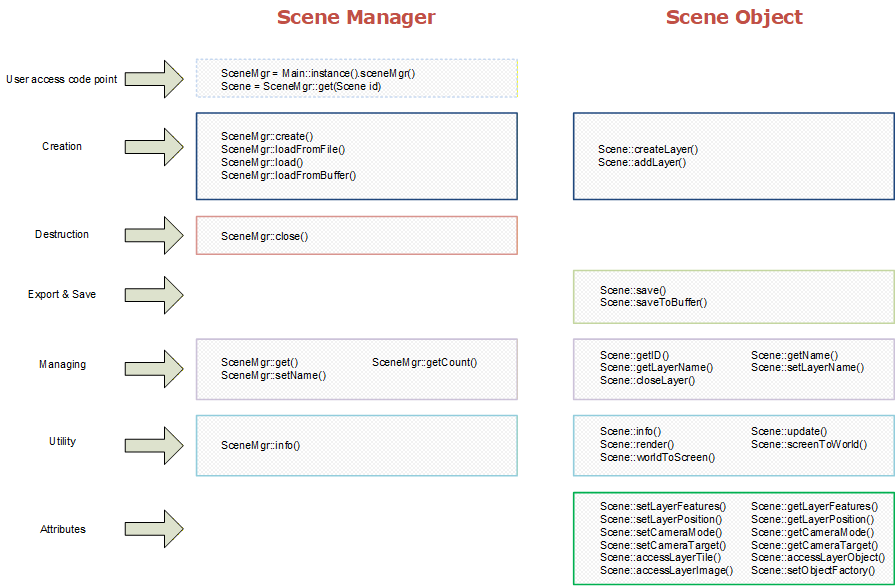
The Scene module is the 2D world runtime advanced with Scene::update() and drawn with Scene::render() from the application's main-thread game loop. Its unified layer architecture integrates tile maps, high-performance entity/object layers, and dynamic image layers into one rendering and logic pipeline.
Fully compatible with the industry-standard Tiled level editor (TMX format), it bridges the gap between level design and runtime execution. Developers can visually construct their worlds while leveraging advanced engine features such as Hybrid Entity-Grid Architecture (HEGA), object factory-driven entity creation, and authoritative world-state persistence back to TMX/TSX resources.
addObject() and closeObject() requests are applied at frame synchronization points. Trigger events are dispatched in three scopes, in this order:
SceneObject::setOnTriggerEvent() SceneLayerObject::setOnTriggerEvent() Scene::setOnTriggerEvent() Use object scope for local object behavior, layer scope for domain-level systems, and global scope for cross-cutting systems (analytics, quest bus, debug overlays).
Register Scene::setOnParticleCollisionEvent() when particle impacts affect gameplay. The emitter must bind an object collision layer, and target objects must enable c64scn_blocks_particles. For a C64Portal, this role is active only while the portal is closed. First-lifetime object hits are collected only while the callback is set and are dispatched after simulation as one event per emitter and target object per update. Decorative particles pay no hit-collection cost when the callback is empty.
The engine supports three distinct layer types, all inheriting from a common base:
| Tile Layers | Grid-based mapping. Supports multiple tilesets, animations, and efficient rendering. Ideal for terrain and static environments. |
|---|---|
| Object Layers (HEGA) | Advanced entity management system. Uses HEGA spatial hashing for fast region queries, frustum culling, and precise collision detection. Supports geometric shapes, triggers, and dynamic visual sprites. |
| Image Layers | Single-image rendering. Perfect for parallax backgrounds, skies, or foreground overlays. Supports tiling and scrolling. |
| Custom Layers | User-defined rendering and logic. Extend the engine by inheriting from any layer type and implementing custom behaviors. |
Scene frame processing specializes the default Threading conventions and uses the main thread:
Scene::update() and Scene::render() must run sequentially on the main thread. They must not overlap each other or another call on the same Scene. Scene::update() can batch independent particle emitters on internal workers. Workers simulate only frozen emitter-local state. Scene layers, object transforms, collision bindings, callbacks and rendering remain main-thread work. The call waits for every worker before returning. addObject() and closeObject() are thread-safe and use an internal Command Buffer. Requests are queued under a high-performance lock and applied at a safe synchronization point at the end of each layer's update logic. update() callbacks or collision queries without fear of iterator invalidation. The Scene is designed for compatibility with Tiled (TMX format).
| TMX Version | v1.0 to v1.10 (Orthogonal orientation, Right-Down render order). |
|---|---|
| Data encoding | CSV, Base64 (uncompressed or zlib compressed). |
| Global settings | infinite is ignored. backgroundcolor is loaded, rendered within the Scene viewport, and preserved when saving. |
| C64SCENE Extensions | Native map format v4.0. Layer IDs start with 1. Custom properties (c64scn_*) configure scene metadata, persisted lighting, light/occluder objects, and effects. v3.0 did not support lighting or effects, EditorC64 automatically upgrades v3 CDC maps to v4. |
| Templates | Supports Tiled object templates (.tx) with optional external <tileset source="..."> and template instances in TMX object layers. |
| Object rotation | Tile and geometric objects support rotation (including negative angles), cached rotated AABB, precise rotated hit-testing, and rotated shape rendering. |
CDC and native C64SCENE loads are strict and atomic: unsupported render order or missing required content closes the partial Scene and returns an error. Ordinary external TMX files remain lenient and may return a Scene while reporting skipped content as warnings.
All native properties use the c64scn_ prefix. They are stored in the <properties> node of the indicated TMX element. Runtime SceneObject properties are strings. On save, recognized C64SCENE properties use TMX bool, int, float, or color types where applicable; unrecognized custom properties remain strings.
| TMX scope | Property | Description |
|---|---|---|
| Map | c64scn_version | Required native format marker; v4.0 uses value 40. |
| Map | c64scn_name | Scene name override. |
| Map | c64scn_creation_date | Creation timestamp metadata. |
| Map | c64scn_modification_date | Modification timestamp metadata. |
| Map | c64scn_viewport_x, c64scn_viewport_y | Viewport origin in screen pixels. |
| Map | c64scn_viewport_width, c64scn_viewport_height | Viewport size in pixels. |
| Map | c64scn_lighting_ambient | Ambient light colour as #RRGGBBAA. |
| Map | c64scn_lighting_ambient_intensity | Ambient intensity from 0.0 to 1.0. |
| Map | c64scn_lighting_enabled | Enables Scene lighting interpretation and rendering. |
| Map | c64scn_effects_enabled | Persisted effects enable state. |
| Layer | c64scn_position_x, c64scn_position_y | Layer world position. |
| Layer | c64scn_speed_x, c64scn_speed_y | Auto-scroll speed per axis. |
| Layer | c64scn_autoscroll | Enables automatic camera scrolling. |
| Layer | c64scn_update | Enables logical updates when nonzero; accepted on load only. |
| Layer | c64scn_smoothscroll | Enables smooth scroll rendering. |
| Layer | c64scn_pause | Pauses layer updates. |
| TileSet | c64scn_alphamod | TileSet image alpha modulation; accepted on load only. |
| Tile layer | c64scn_cellgridcolor | Debug cell-grid colour in 0xRRGGBBAA form. |
| Object layer | c64scn_spatialgridcellsize | HEGA spatial-grid cell size in pixels. |
| Object layer | c64scn_draworder_mode | Object render order: index, topdown, feet, z, or z_feet. |
| Object | c64scn_shape_color | Geometric debug colour as #RRGGBBAA. It colours the optional object shape overlay and does not tint a particle effect. |
| Object | c64scn_z | Integer depth key for z and z_feet object-layer ordering. For a C64Particle, it orders the complete Scene object and its effect. |
Object (C64Particle) | c64scn_particle | Named C64_PARTICLE asset used to clone an independent runtime emitter owned by the object. Takes precedence over preset properties. |
Object (C64Particle) | c64scn_particle_preset | Built-in preset template used only when no particle asset is set. |
Object (C64Particle) | c64scn_particle_autoplay, c64scn_particle_follow | Controls automatic playback and whether the emitter follows the object. |
Object (C64Particle) | c64scn_particle_offset_x, c64scn_particle_offset_y | Adds a world-pixel offset to the object's X/Y emitter anchor when follow is enabled. It does not create or move a second Scene object. |
Object (C64Particle) | c64scn_particle_offscreen_update_rate | Optional integer update rate per second while the live effect bounds are outside the viewport. Missing or 0 keeps full-rate updates. Positive values must be at least 1. This optimization is ignored for effects with collision, sub-emitters, or a simulation scale above 1. |
Object (C64Particle) | c64scn_particle_collision_tile_layer | Name of a tile layer used for particle collision. Value 0 is empty; any non-zero tile makes its complete cell solid. Tile image transparency and Tiled per-tile collision geometry are ignored. |
Object (C64Particle) | c64scn_particle_collision_object_layer | Name of an object layer used for particle collision. It may be used together with the tile collision layer. |
| Object | c64scn_blocks_particles | When true, the object's rectangle, ellipse, point, polygon, polyline or tile shape is compiled into shared Physics geometry for particle collision. The particle emitter must select this object's layer through c64scn_particle_collision_object_layer. Moving or resizing the object updates only its own geometry. On a C64Portal, the role is active only while closed. |
Object (C64Light) | c64scn_light_range_px | Required positive light radius in world pixels. An absent or invalid value disables the light. |
Object (C64Light) | c64scn_light_intensity | Light intensity, clamped to 0.0 through 1.0. The default is 1.0; an invalid value disables the light. |
Object (C64Light) | c64scn_light_color | Light colour as #RRGGBBAA. The default and invalid-value fallback is opaque white. |
Object (C64Light) | c64scn_light_shadows | Enables light occlusion shadows. The default is true. |
Object (C64Light) | c64scn_light_angle_deg | Spot cone angle in degrees. Values greater than 0 and below 360 create a spotlight directed by the object's interpolated rotation; absent or invalid values use a point light. |
Object (C64Light) | c64scn_light_animation | Light animation: none, pulse, flicker, or candle. Absent or invalid values use none; the TMX object ID varies deterministic phase and noise. |
Object (C64Light) | c64scn_light_animation_rate | Animation rate passed to GFXLight. Zero or negative values disable animation; the default is 1.0. |
Object (C64Light) | c64scn_light_animation_amount, c64scn_light_animation_radius_amount | Intensity and radius animation amounts, clamped to 0.0 through 1.0. Defaults are 0.25 and 0.0. |
Object (C64Light) | c64scn_light_secondary_color | Animation low-point colour as #RRGGBBAA. Absent, invalid, or #00000000 values reuse the primary colour. |
Object (C64Occluder or C64Portal) | c64scn_occludes_light | When true, uses rectangle, circle, polygon or polyline geometry as a light occluder. Tiled circles are equal-width and equal-height ellipse shapes; non-circular ellipses are not interpreted. On a C64Portal, the role is active only while closed. |
Object (C64Portal) | c64scn_portal_closed | Controls whether the portal's configured blocking roles are active. Closed portals can occlude light and block particles; open portals do neither. The default is true. |
Object (C64Occluder or C64Portal) | c64scn_movement_cost | Reserved pathfinding cost from 0 to 255: 0 is free/default movement, 1 through 254 add increasing traversal cost, and 255 is impassable. Scene core preserves but does not currently interpret it. A portal's cost is intended to apply only while closed. |
There is a fundamental difference between Tiled and the CRM64Pro Scene regarding layer ordering:
id attribute is purely informational. Important: When designing in Tiled, ensure that your layers' id attributes follow an increasing numerical sequence that matches your desired visual stacking (e.g., Background=1, Ground=2, Foreground=3). If the TMX file contains non-sequential IDs or IDs that do not match the XML node order, the render order in the engine will differ from Tiled.
This is a standard manager: objects are not shared and must be unique using its name as the key. You cannot create an object with the same name as another one already created.
Resource names are restricted to prevent collisions with system assets. The characters '#' and '@' are reserved for internal engine use. Any attempt to create or rename a resource starting with these characters will be rejected (returning a negative error code).
Topics | |
| Scene Layer | |
| Shared base classes and context for Scene layers [v26.08.00]. | |
| Scene | |
| Scene runtime for layered 2D worlds. | |
| Scene Manager | |
| Scene Manager for lifecycle and asset management. | |
Classes | |
| struct | CRM64Pro::SceneCameraParams |
| Camera configuration parameters. More... | |
| enum CRM64Pro::eSceneLayerFeature : Uint32 |
Features for Scene layers.
These flags can be combined using bitwise operators.
| Enumerator | |
|---|---|
| SLF_NONE | No layer features are enabled. Default value. |
| SLF_REPEATX | Enable the layer image to be repeated along the X-axis. |
| SLF_REPEATY | Enable the layer image to be repeated along the Y-axis. |
| SLF_UPDATE | Enable the updating feature. Check update() for further details. |
| SLF_RENDER | Enable the rendering feature. Enabling this flag also enables ::SLF_UPDATE. Disabling render does not disable update. |
| SLF_SMOOTHSCROLL | Enable the smooth rendering feature. Check render() for further details. |
| SLF_PAUSE | Pause the layer. Engine-driven movement/interpolation are frozen for this layer. Scene::update()/render() should still be called to keep global timing and rendering flow consistent. |
| enum CRM64Pro::eSceneDebugOverlay : Uint32 |
Scene debug overlay visualization flags.
Object visualization flags are configured with Scene::setDebugObjectOverlay(). Scene and layer visualization flags are configured with Scene::setDebugOverlay().
| enum CRM64Pro::eSceneDebugObjectType : Uint32 |
Scene object categories used by object debug overlays.
These flags can be combined so each object visualization can target an independent set of object categories.
| enum CRM64Pro::eSceneTileSetType : Sint32 |
| enum CRM64Pro::eSceneStorageMode : Sint32 |
Specifies where the tileset data is physically stored.
| Enumerator | |
|---|---|
| SSM_DISK | Standard file on the physical disk. |
| SSM_CDC | Inside a CRM64Pro::Archive (CDC) file. |
| SSM_INTERNAL | |
| enum CRM64Pro::eSceneShapeType : Sint32 |
Specifies the geometric shape type of a SceneObject.
| enum CRM64Pro::eSceneLayerType : Sint32 |
Specifies the type of a Scene layer.
| Enumerator | |
|---|---|
| SLT_EMPTY | Layer slot exists but has no type-specific data assigned. |
| SLT_TILE | Layer contains tile data (SceneLayerTile). |
| SLT_OBJECT | Layer contains game objects (SceneLayerObject). |
| SLT_IMAGE | Layer displays an image (SceneLayerImage). |
| SLT_USER_START | Start of user-defined layer types. |
| enum CRM64Pro::eSceneObjectRenderOrder : Sint32 |
Specifies object rendering order policy for SceneLayerObject.
| enum CRM64Pro::eSceneTriggerEventType : Uint32 |
| enum CRM64Pro::eSceneCameraMode : Uint32 |
Camera controller modes for a Scene layer.
Camera processing is evaluated during Scene::update() and applied to the selected layer position. The selected layer remains the "camera authority" and linked parallax layers continue to be updated.
| Enumerator | |
|---|---|
| SCM_MANUAL | Manual mode. Camera is controlled only through setLayerPosition()/setCameraPosition(). |
| SCM_AUTOSCROLL | Automatic scrolling by velocity (SceneCameraParams::ptAutoScrollSpeed), then optional clamping. |
| SCM_SNAP | Instant target tracking each logic tick (no damping, no deadzone behavior). |
| SCM_SMOOTH | Damped target tracking using SceneCameraParams::fDamping. |
| SCM_DEADZONE | Damped deadzone tracking; deadzone is centered on SceneCameraParams::ptScreenAnchor. |
| SCM_OFFSET | Damped tracking plus dynamic offset callback (mouse/stick/cinematic bias). |
