 |
CRM64Pro GDK v0.20.0
A free cross-platform game development kit built on top of SDL 3.0
|
|
CRM64Pro GDK v0.20.0
A free cross-platform game development kit built on top of SDL 3.0
|
GFX module providing generic graphics primitives, visual effects and utilities [v26.08.00].
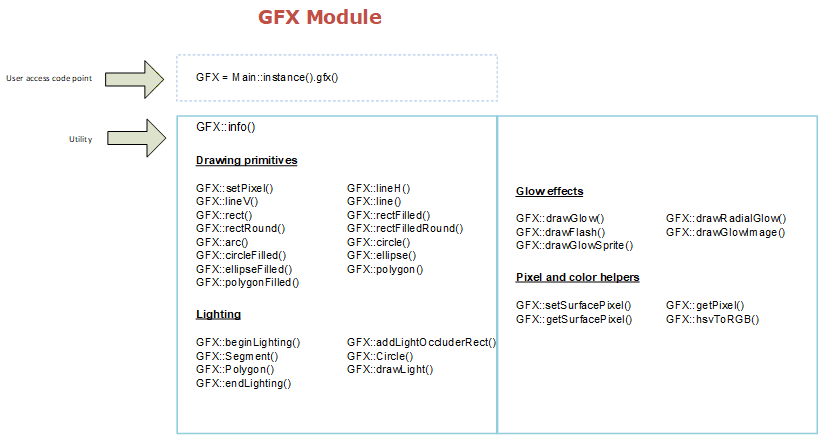
The GFX module provides a collection of generic graphics methods for drawing primitives, immediate visual effects and performing color conversions. Drawing methods are optimized for real-time effects when rendering to screens. When rendering to images, primitives write to the source surface and cached textures are synchronized lazily before the next screen render. Public packed color parameters use logical RGBA order: 0xRRGGBBAA. This is independent from SDL internal surface and texture formats such as SDL_PIXELFORMAT_ARGB8888. setSurfacePixel() and getSurfacePixel() are low-level SDL helpers and use the target SDL_Surface pixel format, not 0xRRGGBBAA.
| Get pixel | Read individual pixel color from an image or screen |
|---|---|
| Set pixel | Write individual pixel color to an image or screen |
| Lines | Horizontal line, vertical line and arbitrary line |
|---|---|
| Rectangle | Outlined and filled rectangle |
| Round rectangle | Outlined and filled rectangle with rounded corners |
| Circle | Outlined and filled circle |
| Ellipse | Outlined and filled ellipse |
| Polygon | Outlined and filled polygon with arbitrary vertices |
| RGB ↔ HSV | Red-Green-Blue to Hue-Saturation-Value |
|---|---|
| RGB ↔ YUV | Red-Green-Blue to Luminance-Chrominance |
| RGB ↔ YCC | Red-Green-Blue to Luminance-Chroma |
The lightmap modulates the already-rendered scene. Scene computes each effective ambient RGB component as ambient color component * ambient intensity, then local lights are added to the remaining LDR range. Full-intensity white ambient is an identity operation and leaves no lightmap headroom for local lights. Direct GFX users should pass the already-combined effective ambient color to beginLighting().
| Scenario | Ambient RGBA | Intensity | Description |
|---|---|---|---|
| Full daylight | #FFFFFFFF | 1.00 | Unmodified scene; local lights have no visible LDR headroom. |
| Cloudy daylight or interior | #FFFFFFFF | 0.65 | Neutral ambient illumination with visible local lights. |
| Sunset | #FFD0A0FF | 0.40 | Warm, reduced ambient illumination. |
| Night | #8090C0FF | 0.15 | Cool low ambient illumination where local lights dominate. |
| Darkness | #FFFFFFFF | 0.00 | No ambient illumination; only local lights reveal the scene. |
| Screen target | Fast enough for real-time effects |
|---|---|
| Image target | Writes the source surface and marks cached textures dirty. Texture upload happens lazily before the next screen render |
Classes | |
| struct | CRM64Pro::GFXLight |
| Point or spot light submitted to a GFX lightmap pass. More... | |
| class | CRM64Pro::GFX |
| GFX class. More... | |
Enumerations | |
| enum | CRM64Pro::eGFXLightAnimation { CRM64Pro::GLA_NONE = 0 , CRM64Pro::GLA_PULSE , CRM64Pro::GLA_FLICKER , CRM64Pro::GLA_CANDLE } |
| Light animation mode. More... | |
Functions | |
| bool | CRM64Pro::GFX::info (Sint32 iMode=0) override |
| Request GFX module information. | |
| bool | CRM64Pro::GFX::beginLighting (Uint8 iR, Uint8 iG, Uint8 iB, Uint8 iA=255, Sint32 idRes=0, const SDL_Rect *pViewport=nullptr) |
| Start a 2D lightmap rendering pass. | |
| bool | CRM64Pro::GFX::addLightOccluderRect (float fX1, float fY1, float fX2, float fY2) |
| Add a rectangular light occluder to the active lighting pass. | |
| bool | CRM64Pro::GFX::addLightOccluderSegment (float fX1, float fY1, float fX2, float fY2) |
| Add a segment light occluder to the active lighting pass. | |
| bool | CRM64Pro::GFX::addLightOccluderCircle (float fX, float fY, float fRadius) |
| Add a circular light occluder to the active lighting pass. | |
| bool | CRM64Pro::GFX::addLightOccluderPolygon (const float *fVX, const float *fVY, Sint32 iNV) |
| Add a polygon light occluder to the active lighting pass. | |
| bool | CRM64Pro::GFX::drawLight (const GFXLight &rLight) |
| Draw a point or spot light into the active lighting pass. | |
| bool | CRM64Pro::GFX::endLighting () |
| Finish the active 2D lightmap rendering pass. | |
| bool | CRM64Pro::GFX::setSurfacePixel (float fX, float fY, Uint32 iColor, SDL_Surface *pSurface) |
| Draw a pixel in a surface. | |
| Uint32 | CRM64Pro::GFX::getSurfacePixel (float fX, float fY, SDL_Surface *pSurface) const |
| Get a pixel color from a surface. | |
| bool | CRM64Pro::GFX::setPixel (float fX, float fY, Uint32 iColor, Sint32 idRes=0) |
| Draw a pixel. | |
| bool | CRM64Pro::GFX::setPixel (float fX, float fY, Uint8 iR, Uint8 iG, Uint8 iB, Uint8 iA, Sint32 idRes=0) |
| Draw a pixel. | |
| Uint32 | CRM64Pro::GFX::getPixel (float fX, float fY, Sint32 idRes=0) const |
| Get a pixel color. | |
| bool | CRM64Pro::GFX::lineH (float fX1, float fX2, float fY, Uint32 iColor, Sint32 idRes=0) |
| Draw a horizontal line. | |
| bool | CRM64Pro::GFX::lineH (float fX1, float fX2, float fY, Uint8 iR, Uint8 iG, Uint8 iB, Uint8 iA, Sint32 idRes=0) |
| Draw a horizontal line. | |
| bool | CRM64Pro::GFX::lineV (float fX, float fY1, float fY2, Uint32 iColor, Sint32 idRes=0) |
| Draw a vertical line. | |
| bool | CRM64Pro::GFX::lineV (float fX, float fY1, float fY2, Uint8 iR, Uint8 iG, Uint8 iB, Uint8 iA, Sint32 idRes=0) |
| Draw a vertical line. | |
| bool | CRM64Pro::GFX::line (float fX1, float fY1, float fX2, float fY2, Uint32 iColor, Sint32 idRes=0) |
| Draw a line. | |
| bool | CRM64Pro::GFX::line (float fX1, float fY1, float fX2, float fY2, Uint8 iR, Uint8 iG, Uint8 iB, Uint8 iA, Sint32 idRes=0) |
| Draw a line. | |
| bool | CRM64Pro::GFX::rect (float fX1, float fY1, float fX2, float fY2, Uint32 iColor, Sint32 idRes=0) |
| Draw an outlined rectangle. | |
| bool | CRM64Pro::GFX::rect (float fX1, float fY1, float fX2, float fY2, Uint8 iR, Uint8 iG, Uint8 iB, Uint8 iA, Sint32 idRes=0) |
| Draw an outlined rectangle. | |
| bool | CRM64Pro::GFX::rectFilled (float fX1, float fY1, float fX2, float fY2, Uint32 iColor, Sint32 idRes=0) |
| Draw a filled rectangle. | |
| bool | CRM64Pro::GFX::rectFilled (float fX1, float fY1, float fX2, float fY2, Uint8 iR, Uint8 iG, Uint8 iB, Uint8 iA, Sint32 idRes=0) |
| Draw a filled rectangle. | |
| bool | CRM64Pro::GFX::rectRound (float fX1, float fY1, float fX2, float fY2, float fRad, Uint32 iColor, Sint32 idRes=0) |
| Draw a round outlined rectangle. | |
| bool | CRM64Pro::GFX::rectRound (float fX1, float fY1, float fX2, float fY2, float fRad, Uint8 iR, Uint8 iG, Uint8 iB, Uint8 iA, Sint32 idRes=0) |
| Draw a round outlined rectangle. | |
| bool | CRM64Pro::GFX::rectFilledRound (float fX1, float fY1, float fX2, float fY2, float fRad, Uint32 iColor, Sint32 idRes=0) |
| Draw a round filled rectangle. | |
| bool | CRM64Pro::GFX::rectFilledRound (float fX1, float fY1, float fX2, float fY2, float fRad, Uint8 iR, Uint8 iG, Uint8 iB, Uint8 iA, Sint32 idRes=0) |
| Draw a round filled rectangle. | |
| bool | CRM64Pro::GFX::arc (float fX, float fY, float fRad, float fStart, float fEnd, Uint32 iColor, Sint32 idRes=0) |
| Draw an arc. | |
| bool | CRM64Pro::GFX::arc (float fX, float fY, float fRad, float fStart, float fEnd, Uint8 iR, Uint8 iG, Uint8 iB, Uint8 iA, Sint32 idRes=0) |
| Draw an arc. | |
| bool | CRM64Pro::GFX::circle (float fX, float fY, float fRad, Uint32 iColor, Sint32 idRes=0) |
| Draw an outlined circle. | |
| bool | CRM64Pro::GFX::circle (float fX, float fY, float fRad, Uint8 iR, Uint8 iG, Uint8 iB, Uint8 iA, Sint32 idRes=0) |
| Draw an outlined circle. | |
| bool | CRM64Pro::GFX::circleFilled (float fX, float fY, float fRad, Uint32 iColor, Sint32 idRes=0) |
| Draw a filled circle. | |
| bool | CRM64Pro::GFX::circleFilled (float fX, float fY, float fRad, Uint8 iR, Uint8 iG, Uint8 iB, Uint8 iA, Sint32 idRes=0) |
| Draw a filled circle. | |
| bool | CRM64Pro::GFX::drawGlow (float fX, float fY, float fRadius, Uint32 iColor, float fIntensity=1.0f, Sint32 idRes=0) |
| Draw a soft additive glow. | |
| bool | CRM64Pro::GFX::drawGlow (float fX, float fY, float fRadius, Uint8 iR, Uint8 iG, Uint8 iB, Uint8 iA, float fIntensity=1.0f, Sint32 idRes=0) |
| Draw a soft additive glow. | |
| bool | CRM64Pro::GFX::drawRadialGlow (float fX, float fY, float fInnerRadius, float fOuterRadius, Uint32 iColor, float fIntensity=1.0f, Sint32 idRes=0) |
| Draw a soft additive radial glow with a solid inner radius. | |
| bool | CRM64Pro::GFX::drawRadialGlow (float fX, float fY, float fInnerRadius, float fOuterRadius, Uint8 iR, Uint8 iG, Uint8 iB, Uint8 iA, float fIntensity=1.0f, Sint32 idRes=0) |
| Draw a soft additive radial glow with a solid inner radius. | |
| bool | CRM64Pro::GFX::drawFlash (float fX, float fY, float fRadius, Uint32 iColor, float fIntensity=1.0f, Sint32 idRes=0) |
| Draw a short hot-center additive flash. | |
| bool | CRM64Pro::GFX::drawFlash (float fX, float fY, float fRadius, Uint8 iR, Uint8 iG, Uint8 iB, Uint8 iA, float fIntensity=1.0f, Sint32 idRes=0) |
| Draw a short hot-center additive flash. | |
| bool | CRM64Pro::GFX::drawGlowImage (Sint32 idImage, float fX, float fY, float fScale, Uint32 iColor, float fIntensity=1.0f, Sint32 idRes=0) |
| Draw an image as a tinted additive glow. | |
| bool | CRM64Pro::GFX::drawGlowImage (Sint32 idImage, float fX, float fY, float fScale, Uint8 iR, Uint8 iG, Uint8 iB, Uint8 iA, float fIntensity=1.0f, Sint32 idRes=0) |
| Draw an image as a tinted additive glow. | |
| bool | CRM64Pro::GFX::drawGlowSprite (Sint32 idSprite, float fX, float fY, float fScale, Uint32 iColor, float fIntensity=1.0f, Sint32 idRes=0) |
| Draw the current sprite frame as a tinted additive glow. | |
| bool | CRM64Pro::GFX::drawGlowSprite (Sint32 idSprite, float fX, float fY, float fScale, Uint8 iR, Uint8 iG, Uint8 iB, Uint8 iA, float fIntensity=1.0f, Sint32 idRes=0) |
| Draw the current sprite frame as a tinted additive glow. | |
| bool | CRM64Pro::GFX::ellipse (float fX, float fY, float fRadX, float fRadY, Uint32 iColor, Sint32 idRes=0) |
| Draw an outlined ellipse. | |
| bool | CRM64Pro::GFX::ellipse (float fX, float fY, float fRadX, float fRadY, Uint8 iR, Uint8 iG, Uint8 iB, Uint8 iA, Sint32 idRes=0) |
| Draw an outlined ellipse. | |
| bool | CRM64Pro::GFX::ellipseFilled (float fX, float fY, float fRadX, float fRadY, Uint32 iColor, Sint32 idRes=0) |
| Draw a filled ellipse. | |
| bool | CRM64Pro::GFX::ellipseFilled (float fX, float fY, float fRadX, float fRadY, Uint8 iR, Uint8 iG, Uint8 iB, Uint8 iA, Sint32 idRes=0) |
| Draw a filled ellipse. | |
| bool | CRM64Pro::GFX::polygon (const float *fVX, const float *fVY, Sint32 iNV, Uint32 iColor, Sint32 idRes=0) |
| Draw an outlined polygon. | |
| bool | CRM64Pro::GFX::polygon (const float *fVX, const float *fVY, Sint32 iNV, Uint8 iR, Uint8 iG, Uint8 iB, Uint8 iA, Sint32 idRes=0) |
| Draw an outlined polygon. | |
| bool | CRM64Pro::GFX::polygonFilled (const float *fVX, const float *fVY, Sint32 iNV, Uint32 iColor, Sint32 idRes=0) |
| Draw a filled polygon. | |
| bool | CRM64Pro::GFX::polygonFilled (const float *fVX, const float *fVY, Sint32 iNV, Uint8 iR, Uint8 iG, Uint8 iB, Uint8 iA, Sint32 idRes=0) |
| Draw a filled polygon. | |
| bool | CRM64Pro::GFX::rgbToHSV (Uint8 iR, Uint8 iG, Uint8 iB, float *fH, float *fS, float *fV) |
| Color conversion from RGB to HSV. | |
| bool | CRM64Pro::GFX::hsvToRGB (float fH, float fS, float fV, Uint8 *iR, Uint8 *iG, Uint8 *iB) |
| Color conversion from HSV to RGB. | |
| bool | CRM64Pro::GFX::rgbToYUV (Uint8 iR, Uint8 iG, Uint8 iB, Uint8 *iY, Uint8 *iU, Uint8 *iV) |
| Color conversion from RGB to YUV. | |
| bool | CRM64Pro::GFX::yuvToRGB (Uint8 iY, Uint8 iU, Uint8 iV, Uint8 *iR, Uint8 *iG, Uint8 *iB) |
| Color conversion from YUV to RGB. | |
| bool | CRM64Pro::GFX::rgbToYCC (Uint8 iR, Uint8 iG, Uint8 iB, Uint8 *iY, Uint8 *iCb, Uint8 *iCr) |
| Color conversion from RGB to YCC. | |
| bool | CRM64Pro::GFX::yccToRGB (Uint8 iY, Uint8 iCb, Uint8 iCr, Uint8 *iR, Uint8 *iG, Uint8 *iB) |
| Color conversion from YCC to RGB. | |
|
override |
Request GFX module information.
Writes information to the default log.
| iMode | Reserved for future use. Pass 0. |
| bool CRM64Pro::GFX::beginLighting | ( | Uint8 | iR, |
| Uint8 | iG, | ||
| Uint8 | iB, | ||
| Uint8 | iA = 255, | ||
| Sint32 | idRes = 0, | ||
| const SDL_Rect * | pViewport = nullptr ) |
Start a 2D lightmap rendering pass.
Creates or reuses a lightmap, clears it to the effective ambient color and redirects rendering to it. Draw the scene first, then call beginLighting(), optionally add light occluders, drawLight() for each light and endLighting().
| iR | Ambient red component. Lower values darken the scene. |
| iG | Ambient green component. Lower values darken the scene. |
| iB | Ambient blue component. Lower values darken the scene. |
| iA | Ambient alpha stored in the lightmap. It does not affect the current MOD composite. |
| idRes | a valid screen handle. By default it tries to use the default screen. |
| pViewport | optional screen-space viewport for the lightmap. nullptr uses the full screen. |
| bool CRM64Pro::GFX::addLightOccluderRect | ( | float | fX1, |
| float | fY1, | ||
| float | fX2, | ||
| float | fY2 ) |
Add a rectangular light occluder to the active lighting pass.
| fX1 | X coordinate of the first rectangle corner. |
| fY1 | Y coordinate of the first rectangle corner. |
| fX2 | X coordinate of the opposite rectangle corner. |
| fY2 | Y coordinate of the opposite rectangle corner. |
| bool CRM64Pro::GFX::addLightOccluderSegment | ( | float | fX1, |
| float | fY1, | ||
| float | fX2, | ||
| float | fY2 ) |
Add a segment light occluder to the active lighting pass.
| fX1 | X coordinate of the segment start. |
| fY1 | Y coordinate of the segment start. |
| fX2 | X coordinate of the segment end. |
| fY2 | Y coordinate of the segment end. |
| bool CRM64Pro::GFX::addLightOccluderCircle | ( | float | fX, |
| float | fY, | ||
| float | fRadius ) |
Add a circular light occluder to the active lighting pass.
| fX | X coordinate of the circle center. |
| fY | Y coordinate of the circle center. |
| fRadius | Circle radius in pixels. Must be greater than 0. |
| bool CRM64Pro::GFX::addLightOccluderPolygon | ( | const float * | fVX, |
| const float * | fVY, | ||
| Sint32 | iNV ) |
Add a polygon light occluder to the active lighting pass.
| fVX | Array of polygon vertex X coordinates. The array is not modified. |
| fVY | Array of polygon vertex Y coordinates. The array is not modified. |
| iNV | Number of vertices. Must be greater than or equal to 3. |
| bool CRM64Pro::GFX::drawLight | ( | const GFXLight & | rLight | ) |
Draw a point or spot light into the active lighting pass.
Evaluates the optional light animation using the lighting pass timestamp, then forwards the sampled light to the existing point or spot renderer.
| rLight | Light position, shape, color, intensity, occlusion and animation parameters. |
| bool CRM64Pro::GFX::endLighting | ( | ) |
Finish the active 2D lightmap rendering pass.
| bool CRM64Pro::GFX::setSurfacePixel | ( | float | fX, |
| float | fY, | ||
| Uint32 | iColor, | ||
| SDL_Surface * | pSurface ) |
Draw a pixel in a surface.
| fX | X (horizontal) coordinate of the pixel. |
| fY | Y (vertical) coordinate of the pixel. |
| iColor | The color value of the pixel to draw, in the SDL_Surface pixel format (not 0xRRGGBBAA). |
| pSurface | SDL_Surface pointer. |
| Uint32 CRM64Pro::GFX::getSurfacePixel | ( | float | fX, |
| float | fY, | ||
| SDL_Surface * | pSurface ) const |
Get a pixel color from a surface.
| fX | X (horizontal) coordinate of the pixel. |
| fY | Y (vertical) coordinate of the pixel. |
| pSurface | SDL_Surface pointer. |
| bool CRM64Pro::GFX::setPixel | ( | float | fX, |
| float | fY, | ||
| Uint32 | iColor, | ||
| Sint32 | idRes = 0 ) |
Draw a pixel.
| fX | X (horizontal) coordinate of the pixel. |
| fY | Y (vertical) coordinate of the pixel. |
| iColor | The color value of the pixel to draw (0xRRGGBBAA). |
| idRes | a valid screen or image handle. By default it tries to use the default screen. |
| bool CRM64Pro::GFX::setPixel | ( | float | fX, |
| float | fY, | ||
| Uint8 | iR, | ||
| Uint8 | iG, | ||
| Uint8 | iB, | ||
| Uint8 | iA, | ||
| Sint32 | idRes = 0 ) |
Draw a pixel.
| fX | X (horizontal) coordinate of the pixel. |
| fY | Y (vertical) coordinate of the pixel. |
| iR | The red color value of the pixel to draw. |
| iG | The green color value of the pixel to draw. |
| iB | The blue color value of the pixel to draw. |
| iA | The alpha value of the pixel to draw. |
| idRes | a valid screen or image handle. By default it tries to use the default screen. |
| Uint32 CRM64Pro::GFX::getPixel | ( | float | fX, |
| float | fY, | ||
| Sint32 | idRes = 0 ) const |
Get a pixel color.
| fX | X (horizontal) coordinate of the pixel. |
| fY | Y (vertical) coordinate of the pixel. |
| idRes | a valid screen or image handle. By default it tries to use the default screen. |
| bool CRM64Pro::GFX::lineH | ( | float | fX1, |
| float | fX2, | ||
| float | fY, | ||
| Uint32 | iColor, | ||
| Sint32 | idRes = 0 ) |
Draw a horizontal line.
| fX1 | X coordinate of the first point of the line. |
| fX2 | X coordinate of the second point of the line. |
| fY | Y coordinate of the points of the line. |
| iColor | The color value (0xRRGGBBAA). |
| idRes | a valid screen or image handle. By default it tries to use the default screen. |
| bool CRM64Pro::GFX::lineH | ( | float | fX1, |
| float | fX2, | ||
| float | fY, | ||
| Uint8 | iR, | ||
| Uint8 | iG, | ||
| Uint8 | iB, | ||
| Uint8 | iA, | ||
| Sint32 | idRes = 0 ) |
Draw a horizontal line.
| fX1 | X coordinate of the first point of the line. |
| fX2 | X coordinate of the second point of the line. |
| fY | Y coordinate of the points of the line. |
| iR | The red color value. |
| iG | The green color value. |
| iB | The blue color value. |
| iA | The alpha value. |
| idRes | a valid screen or image handle. By default it tries to use the default screen. |
| bool CRM64Pro::GFX::lineV | ( | float | fX, |
| float | fY1, | ||
| float | fY2, | ||
| Uint32 | iColor, | ||
| Sint32 | idRes = 0 ) |
Draw a vertical line.
| fX | X coordinate of the points of the line. |
| fY1 | Y coordinate of the first point of the line. |
| fY2 | Y coordinate of the second point of the line. |
| iColor | The color value (0xRRGGBBAA). |
| idRes | a valid screen or image handle. By default it tries to use the default screen. |
| bool CRM64Pro::GFX::lineV | ( | float | fX, |
| float | fY1, | ||
| float | fY2, | ||
| Uint8 | iR, | ||
| Uint8 | iG, | ||
| Uint8 | iB, | ||
| Uint8 | iA, | ||
| Sint32 | idRes = 0 ) |
Draw a vertical line.
| fX | X coordinate of the points of the line. |
| fY1 | Y coordinate of the first point of the line. |
| fY2 | Y coordinate of the second point of the line. |
| iR | The red color value. |
| iG | The green color value. |
| iB | The blue color value. |
| iA | The alpha value. |
| idRes | a valid screen or image handle. By default it tries to use the default screen. |
| bool CRM64Pro::GFX::line | ( | float | fX1, |
| float | fY1, | ||
| float | fX2, | ||
| float | fY2, | ||
| Uint32 | iColor, | ||
| Sint32 | idRes = 0 ) |
Draw a line.
| fX1 | X coordinate of the first point of the line. |
| fY1 | Y coordinate of the first point of the line. |
| fX2 | X coordinate of the second point of the line. |
| fY2 | Y coordinate of the second point of the line. |
| iColor | The color value (0xRRGGBBAA). |
| idRes | a valid screen or image handle. By default it tries to use the default screen. |
| bool CRM64Pro::GFX::line | ( | float | fX1, |
| float | fY1, | ||
| float | fX2, | ||
| float | fY2, | ||
| Uint8 | iR, | ||
| Uint8 | iG, | ||
| Uint8 | iB, | ||
| Uint8 | iA, | ||
| Sint32 | idRes = 0 ) |
Draw a line.
| fX1 | X coordinate of the first point of the line. |
| fY1 | Y coordinate of the first point of the line. |
| fX2 | X coordinate of the second point of the line. |
| fY2 | Y coordinate of the second point of the line. |
| iR | The red color value. |
| iG | The green color value. |
| iB | The blue color value. |
| iA | The alpha value. |
| idRes | a valid screen or image handle. By default it tries to use the default screen. |
| bool CRM64Pro::GFX::rect | ( | float | fX1, |
| float | fY1, | ||
| float | fX2, | ||
| float | fY2, | ||
| Uint32 | iColor, | ||
| Sint32 | idRes = 0 ) |
Draw an outlined rectangle.
| fX1 | X coordinate of the left edge of the rectangle. |
| fY1 | Y coordinate of the top edge of the rectangle. |
| fX2 | X coordinate of the exclusive right edge of the rectangle. |
| fY2 | Y coordinate of the exclusive bottom edge of the rectangle. |
| iColor | The color value (0xRRGGBBAA). |
| idRes | a valid screen or image handle. By default it tries to use the default screen. |
| bool CRM64Pro::GFX::rect | ( | float | fX1, |
| float | fY1, | ||
| float | fX2, | ||
| float | fY2, | ||
| Uint8 | iR, | ||
| Uint8 | iG, | ||
| Uint8 | iB, | ||
| Uint8 | iA, | ||
| Sint32 | idRes = 0 ) |
Draw an outlined rectangle.
| fX1 | X coordinate of the left edge of the rectangle. |
| fY1 | Y coordinate of the top edge of the rectangle. |
| fX2 | X coordinate of the exclusive right edge of the rectangle. |
| fY2 | Y coordinate of the exclusive bottom edge of the rectangle. |
| iR | The red color value. |
| iG | The green color value. |
| iB | The blue color value. |
| iA | The alpha value. |
| idRes | a valid screen or image handle. By default it tries to use the default screen. |
| bool CRM64Pro::GFX::rectFilled | ( | float | fX1, |
| float | fY1, | ||
| float | fX2, | ||
| float | fY2, | ||
| Uint32 | iColor, | ||
| Sint32 | idRes = 0 ) |
Draw a filled rectangle.
| fX1 | X coordinate of the left edge of the rectangle. |
| fY1 | Y coordinate of the top edge of the rectangle. |
| fX2 | X coordinate of the exclusive right edge of the rectangle. |
| fY2 | Y coordinate of the exclusive bottom edge of the rectangle. |
| iColor | The color value (0xRRGGBBAA). |
| idRes | a valid screen or image handle. By default it tries to use the default screen. |
| bool CRM64Pro::GFX::rectFilled | ( | float | fX1, |
| float | fY1, | ||
| float | fX2, | ||
| float | fY2, | ||
| Uint8 | iR, | ||
| Uint8 | iG, | ||
| Uint8 | iB, | ||
| Uint8 | iA, | ||
| Sint32 | idRes = 0 ) |
Draw a filled rectangle.
| fX1 | X coordinate of the left edge of the rectangle. |
| fY1 | Y coordinate of the top edge of the rectangle. |
| fX2 | X coordinate of the exclusive right edge of the rectangle. |
| fY2 | Y coordinate of the exclusive bottom edge of the rectangle. |
| iR | The red color value. |
| iG | The green color value. |
| iB | The blue color value. |
| iA | The alpha value. |
| idRes | a valid screen or image handle. By default it tries to use the default screen. |
| bool CRM64Pro::GFX::rectRound | ( | float | fX1, |
| float | fY1, | ||
| float | fX2, | ||
| float | fY2, | ||
| float | fRad, | ||
| Uint32 | iColor, | ||
| Sint32 | idRes = 0 ) |
Draw a round outlined rectangle.
| fX1 | X coordinate of the left edge of the rectangle. |
| fY1 | Y coordinate of the top edge of the rectangle. |
| fX2 | X coordinate of the exclusive right edge of the rectangle. |
| fY2 | Y coordinate of the exclusive bottom edge of the rectangle. |
| fRad | Radius in pixels of the corner arc. |
| iColor | The color value (0xRRGGBBAA). |
| idRes | a valid screen or image handle. By default it tries to use the default screen. |
| bool CRM64Pro::GFX::rectRound | ( | float | fX1, |
| float | fY1, | ||
| float | fX2, | ||
| float | fY2, | ||
| float | fRad, | ||
| Uint8 | iR, | ||
| Uint8 | iG, | ||
| Uint8 | iB, | ||
| Uint8 | iA, | ||
| Sint32 | idRes = 0 ) |
Draw a round outlined rectangle.
| fX1 | X coordinate of the left edge of the rectangle. |
| fY1 | Y coordinate of the top edge of the rectangle. |
| fX2 | X coordinate of the exclusive right edge of the rectangle. |
| fY2 | Y coordinate of the exclusive bottom edge of the rectangle. |
| fRad | Radius in pixels of the corner arc. |
| iR | The red color value. |
| iG | The green color value. |
| iB | The blue color value. |
| iA | The alpha value. |
| idRes | a valid screen or image handle. By default it tries to use the default screen. |
| bool CRM64Pro::GFX::rectFilledRound | ( | float | fX1, |
| float | fY1, | ||
| float | fX2, | ||
| float | fY2, | ||
| float | fRad, | ||
| Uint32 | iColor, | ||
| Sint32 | idRes = 0 ) |
Draw a round filled rectangle.
| fX1 | X coordinate of the left edge of the rectangle. |
| fY1 | Y coordinate of the top edge of the rectangle. |
| fX2 | X coordinate of the exclusive right edge of the rectangle. |
| fY2 | Y coordinate of the exclusive bottom edge of the rectangle. |
| fRad | Radius in pixels of the corner arc. |
| iColor | The color value (0xRRGGBBAA). |
| idRes | a valid screen or image handle. By default it tries to use the default screen. |
| bool CRM64Pro::GFX::rectFilledRound | ( | float | fX1, |
| float | fY1, | ||
| float | fX2, | ||
| float | fY2, | ||
| float | fRad, | ||
| Uint8 | iR, | ||
| Uint8 | iG, | ||
| Uint8 | iB, | ||
| Uint8 | iA, | ||
| Sint32 | idRes = 0 ) |
Draw a round filled rectangle.
| fX1 | X coordinate of the left edge of the rectangle. |
| fY1 | Y coordinate of the top edge of the rectangle. |
| fX2 | X coordinate of the exclusive right edge of the rectangle. |
| fY2 | Y coordinate of the exclusive bottom edge of the rectangle. |
| fRad | Radius in pixels of the corner arc. |
| iR | The red color value. |
| iG | The green color value. |
| iB | The blue color value. |
| iA | The alpha value. |
| idRes | a valid screen or image handle. By default it tries to use the default screen. |
| bool CRM64Pro::GFX::arc | ( | float | fX, |
| float | fY, | ||
| float | fRad, | ||
| float | fStart, | ||
| float | fEnd, | ||
| Uint32 | iColor, | ||
| Sint32 | idRes = 0 ) |
Draw an arc.
| fX | X coordinate of the center of the arc. |
| fY | Y coordinate of the center of the arc. |
| fRad | Radius in pixels of the arc. |
| fStart | Starting radius in degrees of the arc. 0 degrees is down, increasing counterclockwise. |
| fEnd | Ending radius in degrees of the arc. 0 degrees is down, increasing counterclockwise. |
| iColor | The color value (0xRRGGBBAA). |
| idRes | a valid screen or image handle. By default it tries to use the default screen. |
| bool CRM64Pro::GFX::arc | ( | float | fX, |
| float | fY, | ||
| float | fRad, | ||
| float | fStart, | ||
| float | fEnd, | ||
| Uint8 | iR, | ||
| Uint8 | iG, | ||
| Uint8 | iB, | ||
| Uint8 | iA, | ||
| Sint32 | idRes = 0 ) |
Draw an arc.
| fX | X coordinate of the center of the arc. |
| fY | Y coordinate of the center of the arc. |
| fRad | Radius in pixels of the arc. |
| fStart | Starting radius in degrees of the arc. 0 degrees is down, increasing counterclockwise. |
| fEnd | Ending radius in degrees of the arc. 0 degrees is down, increasing counterclockwise. |
| iR | The red color value. |
| iG | The green color value. |
| iB | The blue color value. |
| iA | The alpha value. |
| idRes | a valid screen or image handle. By default it tries to use the default screen. |
| bool CRM64Pro::GFX::circle | ( | float | fX, |
| float | fY, | ||
| float | fRad, | ||
| Uint32 | iColor, | ||
| Sint32 | idRes = 0 ) |
Draw an outlined circle.
| fX | X coordinate of the center of the circle. |
| fY | Y coordinate of the center of the circle. |
| fRad | Radius in pixels of the circle. |
| iColor | The color value (0xRRGGBBAA). |
| idRes | a valid screen or image handle. By default it tries to use the default screen. |
| bool CRM64Pro::GFX::circle | ( | float | fX, |
| float | fY, | ||
| float | fRad, | ||
| Uint8 | iR, | ||
| Uint8 | iG, | ||
| Uint8 | iB, | ||
| Uint8 | iA, | ||
| Sint32 | idRes = 0 ) |
Draw an outlined circle.
| fX | X coordinate of the center of the circle. |
| fY | Y coordinate of the center of the circle. |
| fRad | Radius in pixels of the circle. |
| iR | The red color value. |
| iG | The green color value. |
| iB | The blue color value. |
| iA | The alpha value. |
| idRes | a valid screen or image handle. By default it tries to use the default screen. |
| bool CRM64Pro::GFX::circleFilled | ( | float | fX, |
| float | fY, | ||
| float | fRad, | ||
| Uint32 | iColor, | ||
| Sint32 | idRes = 0 ) |
Draw a filled circle.
| fX | X coordinate of the center of the circle. |
| fY | Y coordinate of the center of the circle. |
| fRad | Radius in pixels of the circle. |
| iColor | The color value (0xRRGGBBAA). |
| idRes | a valid screen or image handle. By default it tries to use the default screen. |
| bool CRM64Pro::GFX::circleFilled | ( | float | fX, |
| float | fY, | ||
| float | fRad, | ||
| Uint8 | iR, | ||
| Uint8 | iG, | ||
| Uint8 | iB, | ||
| Uint8 | iA, | ||
| Sint32 | idRes = 0 ) |
Draw a filled circle.
| fX | X coordinate of the center of the circle. |
| fY | Y coordinate of the center of the circle. |
| fRad | Radius in pixels of the circle. |
| iR | The red color value. |
| iG | The green color value. |
| iB | The blue color value. |
| iA | The alpha value. |
| idRes | a valid screen or image handle. By default it tries to use the default screen. |
| bool CRM64Pro::GFX::drawGlow | ( | float | fX, |
| float | fY, | ||
| float | fRadius, | ||
| Uint32 | iColor, | ||
| float | fIntensity = 1.0f, | ||
| Sint32 | idRes = 0 ) |
Draw a soft additive glow.
| fX | X coordinate of the center of the glow. |
| fY | Y coordinate of the center of the glow. |
| fRadius | Radius in pixels of the glow. Must be greater than 0. |
| iColor | The color value (0xRRGGBBAA). |
| fIntensity | Nonnegative brightness multiplier. Values above 1.0 are clamped. Default is 1.0. |
| idRes | a valid screen or image handle. By default it tries to use the default screen. |
| bool CRM64Pro::GFX::drawGlow | ( | float | fX, |
| float | fY, | ||
| float | fRadius, | ||
| Uint8 | iR, | ||
| Uint8 | iG, | ||
| Uint8 | iB, | ||
| Uint8 | iA, | ||
| float | fIntensity = 1.0f, | ||
| Sint32 | idRes = 0 ) |
Draw a soft additive glow.
| fX | X coordinate of the center of the glow. |
| fY | Y coordinate of the center of the glow. |
| fRadius | Radius in pixels of the glow. Must be greater than 0. |
| iR | The red color value. |
| iG | The green color value. |
| iB | The blue color value. |
| iA | The alpha value. |
| fIntensity | Nonnegative brightness multiplier. Values above 1.0 are clamped. Default is 1.0. |
| idRes | a valid screen or image handle. By default it tries to use the default screen. |
| bool CRM64Pro::GFX::drawRadialGlow | ( | float | fX, |
| float | fY, | ||
| float | fInnerRadius, | ||
| float | fOuterRadius, | ||
| Uint32 | iColor, | ||
| float | fIntensity = 1.0f, | ||
| Sint32 | idRes = 0 ) |
Draw a soft additive radial glow with a solid inner radius.
| fX | X coordinate of the center of the glow. |
| fY | Y coordinate of the center of the glow. |
| fInnerRadius | Radius in pixels of the full-intensity core. Must be greater than or equal to 0. |
| fOuterRadius | Outer radius in pixels where the glow fades to transparent. Must be greater than 0. |
| iColor | The color value (0xRRGGBBAA). |
| fIntensity | Nonnegative brightness multiplier. Values above 1.0 are clamped. Default is 1.0. |
| idRes | a valid screen or image handle. By default it tries to use the default screen. |
| bool CRM64Pro::GFX::drawRadialGlow | ( | float | fX, |
| float | fY, | ||
| float | fInnerRadius, | ||
| float | fOuterRadius, | ||
| Uint8 | iR, | ||
| Uint8 | iG, | ||
| Uint8 | iB, | ||
| Uint8 | iA, | ||
| float | fIntensity = 1.0f, | ||
| Sint32 | idRes = 0 ) |
Draw a soft additive radial glow with a solid inner radius.
| fX | X coordinate of the center of the glow. |
| fY | Y coordinate of the center of the glow. |
| fInnerRadius | Radius in pixels of the full-intensity core. Must be greater than or equal to 0. |
| fOuterRadius | Outer radius in pixels where the glow fades to transparent. Must be greater than 0. |
| iR | The red color value. |
| iG | The green color value. |
| iB | The blue color value. |
| iA | The alpha value. |
| fIntensity | Nonnegative brightness multiplier. Values above 1.0 are clamped. Default is 1.0. |
| idRes | a valid screen or image handle. By default it tries to use the default screen. |
| bool CRM64Pro::GFX::drawFlash | ( | float | fX, |
| float | fY, | ||
| float | fRadius, | ||
| Uint32 | iColor, | ||
| float | fIntensity = 1.0f, | ||
| Sint32 | idRes = 0 ) |
Draw a short hot-center additive flash.
| fX | X coordinate of the center of the flash. |
| fY | Y coordinate of the center of the flash. |
| fRadius | Radius in pixels of the flash. Must be greater than 0. |
| iColor | The color value (0xRRGGBBAA). |
| fIntensity | Nonnegative brightness multiplier. Values above 1.0 are clamped. Default is 1.0. |
| idRes | a valid screen or image handle. By default it tries to use the default screen. |
| bool CRM64Pro::GFX::drawFlash | ( | float | fX, |
| float | fY, | ||
| float | fRadius, | ||
| Uint8 | iR, | ||
| Uint8 | iG, | ||
| Uint8 | iB, | ||
| Uint8 | iA, | ||
| float | fIntensity = 1.0f, | ||
| Sint32 | idRes = 0 ) |
Draw a short hot-center additive flash.
| fX | X coordinate of the center of the flash. |
| fY | Y coordinate of the center of the flash. |
| fRadius | Radius in pixels of the flash. Must be greater than 0. |
| iR | The red color value. |
| iG | The green color value. |
| iB | The blue color value. |
| iA | The alpha value. |
| fIntensity | Nonnegative brightness multiplier. Values above 1.0 are clamped. Default is 1.0. |
| idRes | a valid screen or image handle. By default it tries to use the default screen. |
| bool CRM64Pro::GFX::drawGlowImage | ( | Sint32 | idImage, |
| float | fX, | ||
| float | fY, | ||
| float | fScale, | ||
| Uint32 | iColor, | ||
| float | fIntensity = 1.0f, | ||
| Sint32 | idRes = 0 ) |
Draw an image as a tinted additive glow.
| idImage | Image handle used as the glow sprite. |
| fX | X coordinate of the center of the glow image. |
| fY | Y coordinate of the center of the glow image. |
| fScale | Uniform scale applied to the image. Must be greater than 0. |
| iColor | The color value (0xRRGGBBAA). |
| fIntensity | Nonnegative brightness multiplier. Values above 1.0 are clamped. Default is 1.0. |
| idRes | a valid screen or image handle. By default it tries to use the default screen. |
| bool CRM64Pro::GFX::drawGlowImage | ( | Sint32 | idImage, |
| float | fX, | ||
| float | fY, | ||
| float | fScale, | ||
| Uint8 | iR, | ||
| Uint8 | iG, | ||
| Uint8 | iB, | ||
| Uint8 | iA, | ||
| float | fIntensity = 1.0f, | ||
| Sint32 | idRes = 0 ) |
Draw an image as a tinted additive glow.
| idImage | Image handle used as the glow sprite. |
| fX | X coordinate of the center of the glow image. |
| fY | Y coordinate of the center of the glow image. |
| fScale | Uniform scale applied to the image. Must be greater than 0. |
| iR | The red color value. |
| iG | The green color value. |
| iB | The blue color value. |
| iA | The alpha value. |
| fIntensity | Nonnegative brightness multiplier. Values above 1.0 are clamped. Default is 1.0. |
| idRes | a valid screen or image handle. By default it tries to use the default screen. |
| bool CRM64Pro::GFX::drawGlowSprite | ( | Sint32 | idSprite, |
| float | fX, | ||
| float | fY, | ||
| float | fScale, | ||
| Uint32 | iColor, | ||
| float | fIntensity = 1.0f, | ||
| Sint32 | idRes = 0 ) |
Draw the current sprite frame as a tinted additive glow.
| idSprite | Sprite handle used as the glow sprite. |
| fX | X coordinate of the sprite position. The current sprite hotspot controls the rendered top-left corner. |
| fY | Y coordinate of the sprite position. The current sprite hotspot controls the rendered top-left corner. |
| fScale | Uniform scale applied to the sprite. Must be greater than 0. |
| iColor | The color value (0xRRGGBBAA). |
| fIntensity | Nonnegative brightness multiplier. Values above 1.0 are clamped. Default is 1.0. |
| idRes | a valid screen or image handle. By default it tries to use the default screen. |
| bool CRM64Pro::GFX::drawGlowSprite | ( | Sint32 | idSprite, |
| float | fX, | ||
| float | fY, | ||
| float | fScale, | ||
| Uint8 | iR, | ||
| Uint8 | iG, | ||
| Uint8 | iB, | ||
| Uint8 | iA, | ||
| float | fIntensity = 1.0f, | ||
| Sint32 | idRes = 0 ) |
Draw the current sprite frame as a tinted additive glow.
| idSprite | Sprite handle used as the glow sprite. |
| fX | X coordinate of the sprite position. The current sprite hotspot controls the rendered top-left corner. |
| fY | Y coordinate of the sprite position. The current sprite hotspot controls the rendered top-left corner. |
| fScale | Uniform scale applied to the sprite. Must be greater than 0. |
| iR | The red color value. |
| iG | The green color value. |
| iB | The blue color value. |
| iA | The alpha value. |
| fIntensity | Nonnegative brightness multiplier. Values above 1.0 are clamped. Default is 1.0. |
| idRes | a valid screen or image handle. By default it tries to use the default screen. |
| bool CRM64Pro::GFX::ellipse | ( | float | fX, |
| float | fY, | ||
| float | fRadX, | ||
| float | fRadY, | ||
| Uint32 | iColor, | ||
| Sint32 | idRes = 0 ) |
Draw an outlined ellipse.
| fX | X coordinate of the center of the ellipse. |
| fY | Y coordinate of the center of the ellipse. |
| fRadX | horizontal radius in pixels of the ellipse. |
| fRadY | vertical radius in pixels of the ellipse. |
| iColor | The color value (0xRRGGBBAA). |
| idRes | a valid screen or image handle. By default it tries to use the default screen. |
| bool CRM64Pro::GFX::ellipse | ( | float | fX, |
| float | fY, | ||
| float | fRadX, | ||
| float | fRadY, | ||
| Uint8 | iR, | ||
| Uint8 | iG, | ||
| Uint8 | iB, | ||
| Uint8 | iA, | ||
| Sint32 | idRes = 0 ) |
Draw an outlined ellipse.
| fX | X coordinate of the center of the ellipse. |
| fY | Y coordinate of the center of the ellipse. |
| fRadX | horizontal radius in pixels of the ellipse. |
| fRadY | vertical radius in pixels of the ellipse. |
| iR | The red color value. |
| iG | The green color value. |
| iB | The blue color value. |
| iA | The alpha value. |
| idRes | a valid screen or image handle. By default it tries to use the default screen. |
| bool CRM64Pro::GFX::ellipseFilled | ( | float | fX, |
| float | fY, | ||
| float | fRadX, | ||
| float | fRadY, | ||
| Uint32 | iColor, | ||
| Sint32 | idRes = 0 ) |
Draw a filled ellipse.
| fX | X coordinate of the center of the ellipse. |
| fY | Y coordinate of the center of the ellipse. |
| fRadX | horizontal radius in pixels of the ellipse. |
| fRadY | vertical radius in pixels of the ellipse. |
| iColor | The color value (0xRRGGBBAA). |
| idRes | a valid screen or image handle. By default it tries to use the default screen. |
| bool CRM64Pro::GFX::ellipseFilled | ( | float | fX, |
| float | fY, | ||
| float | fRadX, | ||
| float | fRadY, | ||
| Uint8 | iR, | ||
| Uint8 | iG, | ||
| Uint8 | iB, | ||
| Uint8 | iA, | ||
| Sint32 | idRes = 0 ) |
Draw a filled ellipse.
| fX | X coordinate of the center of the ellipse. |
| fY | Y coordinate of the center of the ellipse. |
| fRadX | horizontal radius in pixels of the ellipse. |
| fRadY | vertical radius in pixels of the ellipse. |
| iR | The red color value. |
| iG | The green color value. |
| iB | The blue color value. |
| iA | The alpha value. |
| idRes | a valid screen or image handle. By default it tries to use the default screen. |
| bool CRM64Pro::GFX::polygon | ( | const float * | fVX, |
| const float * | fVY, | ||
| Sint32 | iNV, | ||
| Uint32 | iColor, | ||
| Sint32 | idRes = 0 ) |
Draw an outlined polygon.
| fVX | Vertex array containing X coordinates of the points of the polygon. The array is not modified. |
| fVY | Vertex array containing Y coordinates of the points of the polygon. The array is not modified. |
| iNV | Number of points in the vertex array. From a minimum number of 3 up to 31. |
| iColor | The color value (0xRRGGBBAA). |
| idRes | a valid screen or image handle. By default it tries to use the default screen. |
| bool CRM64Pro::GFX::polygon | ( | const float * | fVX, |
| const float * | fVY, | ||
| Sint32 | iNV, | ||
| Uint8 | iR, | ||
| Uint8 | iG, | ||
| Uint8 | iB, | ||
| Uint8 | iA, | ||
| Sint32 | idRes = 0 ) |
Draw an outlined polygon.
| fVX | Vertex array containing X coordinates of the points of the polygon. The array is not modified. |
| fVY | Vertex array containing Y coordinates of the points of the polygon. The array is not modified. |
| iNV | Number of points in the vertex array. From a minimum number of 3 up to 31. |
| iR | The red color value. |
| iG | The green color value. |
| iB | The blue color value. |
| iA | The alpha value. |
| idRes | a valid screen or image handle. By default it tries to use the default screen. |
| bool CRM64Pro::GFX::polygonFilled | ( | const float * | fVX, |
| const float * | fVY, | ||
| Sint32 | iNV, | ||
| Uint32 | iColor, | ||
| Sint32 | idRes = 0 ) |
Draw a filled polygon.
| fVX | Vertex array containing X coordinates of the points of the polygon. The array is not modified. |
| fVY | Vertex array containing Y coordinates of the points of the polygon. The array is not modified. |
| iNV | Number of points in the vertex array. From a minimum number of 3 up to 31. |
| iColor | The color value (0xRRGGBBAA). |
| idRes | a valid screen or image handle. By default it tries to use the default screen. |
| bool CRM64Pro::GFX::polygonFilled | ( | const float * | fVX, |
| const float * | fVY, | ||
| Sint32 | iNV, | ||
| Uint8 | iR, | ||
| Uint8 | iG, | ||
| Uint8 | iB, | ||
| Uint8 | iA, | ||
| Sint32 | idRes = 0 ) |
Draw a filled polygon.
| fVX | Vertex array containing X coordinates of the points of the polygon. The array is not modified. |
| fVY | Vertex array containing Y coordinates of the points of the polygon. The array is not modified. |
| iNV | Number of points in the vertex array. From a minimum number of 3 up to 31. |
| iR | The red color value. |
| iG | The green color value. |
| iB | The blue color value. |
| iA | The alpha value. |
| idRes | a valid screen or image handle. By default it tries to use the default screen. |
| bool CRM64Pro::GFX::rgbToHSV | ( | Uint8 | iR, |
| Uint8 | iG, | ||
| Uint8 | iB, | ||
| float * | fH, | ||
| float * | fS, | ||
| float * | fV ) |
Color conversion from RGB to HSV.
| iR | Red component. |
| iG | Green component. |
| iB | Blue component. |
| fH | non-null pointer to Hue component. Greys use -1. |
| fS | non-null pointer to Saturation component in the range [0, 1]. |
| fV | non-null pointer to Value component in the range [0, 1]. |
| bool CRM64Pro::GFX::hsvToRGB | ( | float | fH, |
| float | fS, | ||
| float | fV, | ||
| Uint8 * | iR, | ||
| Uint8 * | iG, | ||
| Uint8 * | iB ) |
Color conversion from HSV to RGB.
| fH | finite Hue component in degrees. Values are normalized to [0, 360). |
| fS | Saturation component in the range [0, 1]. |
| fV | Value component in the range [0, 1]. |
| iR | non-null pointer to Red component. |
| iG | non-null pointer to Green component. |
| iB | non-null pointer to Blue component. |
| bool CRM64Pro::GFX::rgbToYUV | ( | Uint8 | iR, |
| Uint8 | iG, | ||
| Uint8 | iB, | ||
| Uint8 * | iY, | ||
| Uint8 * | iU, | ||
| Uint8 * | iV ) |
Color conversion from RGB to YUV.
| iR | Red component. |
| iG | Green component. |
| iB | Blue component. |
| iY | non-null pointer to luma component. |
| iU | non-null pointer to chrominance U component. |
| iV | non-null pointer to chrominance V component. |
| bool CRM64Pro::GFX::yuvToRGB | ( | Uint8 | iY, |
| Uint8 | iU, | ||
| Uint8 | iV, | ||
| Uint8 * | iR, | ||
| Uint8 * | iG, | ||
| Uint8 * | iB ) |
Color conversion from YUV to RGB.
| iY | luma component. |
| iU | chrominance U component. |
| iV | chrominance V component. |
| iR | non-null pointer to Red component. |
| iG | non-null pointer to Green component. |
| iB | non-null pointer to Blue component. |
| bool CRM64Pro::GFX::rgbToYCC | ( | Uint8 | iR, |
| Uint8 | iG, | ||
| Uint8 | iB, | ||
| Uint8 * | iY, | ||
| Uint8 * | iCb, | ||
| Uint8 * | iCr ) |
Color conversion from RGB to YCC.
| iR | Red component. |
| iG | Green component. |
| iB | Blue component. |
| iY | non-null pointer to luma component. |
| iCb | non-null pointer to chrominance blue component. |
| iCr | non-null pointer to chrominance red component. |
| bool CRM64Pro::GFX::yccToRGB | ( | Uint8 | iY, |
| Uint8 | iCb, | ||
| Uint8 | iCr, | ||
| Uint8 * | iR, | ||
| Uint8 * | iG, | ||
| Uint8 * | iB ) |
Color conversion from YCC to RGB.
| iY | luma component. |
| iCb | chrominance blue component. |
| iCr | chrominance red component. |
| iR | non-null pointer to Red component. |
| iG | non-null pointer to Green component. |
| iB | non-null pointer to Blue component. |
